AMLR Solutions
  AMLR Consultation
 EUDI Wallet
 Onboarding
 Ongoing Monitoring
 FRAML
FRAML KYC
KYC KYB
KYB KYI
KYI Age Assurance
 Workforce IAM
 Candidate Verification
 Account Takeover
 Bonus/ Promotion Abuse
 Chargeback Fraud
 Deepfake
 Document Fraud
 Fraud Networks
 Impersonation Fraud
 Money Mule Activity
 Multi-Accounting
 Party Fraud
 Regulatory & Compliance Risks
 Synthetic Identity Fraud
 Adult Content
 Banking
 Crypto
 Fintech
 Forex
Forex Compliance
 Fraud prevention
 Trust & safety
 Global expansion
 Compliance Officers
 Developers
 Fraud Analysts
 Product Managers
 Journey Builder
  Global Trust Platform
 Customer Profiles
 Vendor Comparison
 IDV Case Management
 AML Case Management
 Regulatory Reporting
 Agentic Rule Builder
  AI Compliance Co-Pilot
  Fraud Analytics
 Fraud Hub
  OCR
OCR Shufti AI
 Bank Account Verification
  Biometric Duplication
 Database Checks
 Document Intelligence
 Government ID
 Mobile Driver's License
 NFC
NFC Selfie Liveness
 Brand Personalisation
 Deployment Options
 Identity Methods
 IDV Modes
 Multi-tenancy
 On-Premise IDV
 Secure Capture
 Shufti MCP
















TL;DR
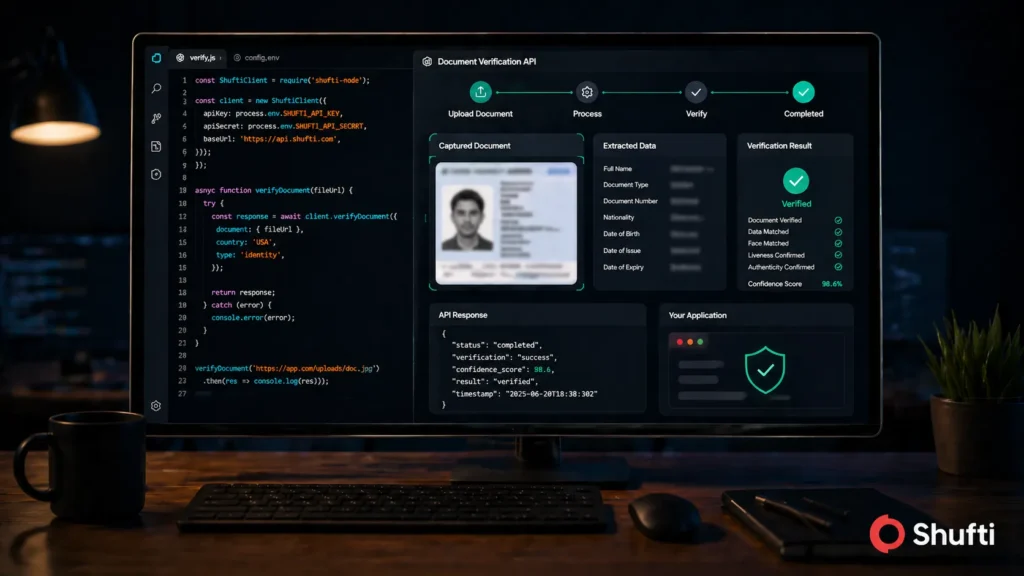
- A document verification API connects your app to a remote engine that accepts document images, runs OCR and fraud checks, then returns a structured JSON decision all in under 15 seconds.
- There are three integration paths: REST API (server-to-server, full control), native SDK (handles camera capture and liveness on mobile), and iFrame (hosted flow with minimal backend effort).
- Authentication uses Client ID and Secret Key passed as Basic Auth headers; always treat these credentials the same way you would payment keys — never expose them client-side.
- Webhooks handle asynchronous callbacks so your system receives verification results without polling; configure a callback_url in every request and validate the response signature.
- Test in the sandbox environment first Shufti’s sandbox mirrors production response structures, error codes, and webhook payloads exactly, so what you validate there holds at scale.
- Shufti Document Verification API processes verifications across 10,000+ document types in 240+ countries with a 99.3% fraud detection rate, completing the full check in under 15 seconds.
By reducing the need for manual intervention, Document Verification APIs help lower operational costs. Businesses no longer need to employ large teams for document verification, as the API can handle this automatically.
Many industries, particularly in finance, require strict adherence to regulatory standards such as KYC (Know Your Customer), AML (Anti-Money Laundering), and GDPR (General Data Protection Regulation). Using a Document Verification API ensures businesses stay compliant with these regulations by providing reliable and auditable verification processes.
APIs are inherently scalable, allowing businesses to handle increased verification volumes without significant changes to infrastructure or operations. This is particularly beneficial for businesses in rapidly growing markets or those experiencing surges in traffic.
Many APIs can support a wide variety of document types (e.g., passports, driver’s licenses, ID cards) and cater to multiple languages and formats, enabling businesses to serve a global audience efficiently.
Features of Document Verification API
A Document Verification API typically offers a range of features designed to automate and enhance the process of verifying identity documents. The key features include:
1. Real-Time Verification:
Instantly validates documents upon submission, ensuring fast decision-making for businesses. This is crucial for industries like financial services, where speed is critical.
2. Document Type Recognition:
Automatically identifies and processes a wide range of document types such as passports, driver’s licenses, national IDs, utility bills, and other identity-related documents. It can distinguish between different types of documents to apply the correct validation process.
3. OCR (Optical Character Recognition):
Extracts and processes text from images of documents, enabling the API to read and validate information such as names, addresses, document numbers, dates of birth, and other essential details.
4. Fraud Detection and Tamper Detection:
Identifies signs of document tampering, forgery, or counterfeiting, such as altered text, mismatched fonts, and manipulated images. This helps ensure that the document is legitimate and unaltered.
5. Image Quality Verification:
Checks the quality of the document images submitted to ensure they are clear enough for verification. This may include detecting blurry, low-resolution, or poorly-lit images that could compromise the verification process.
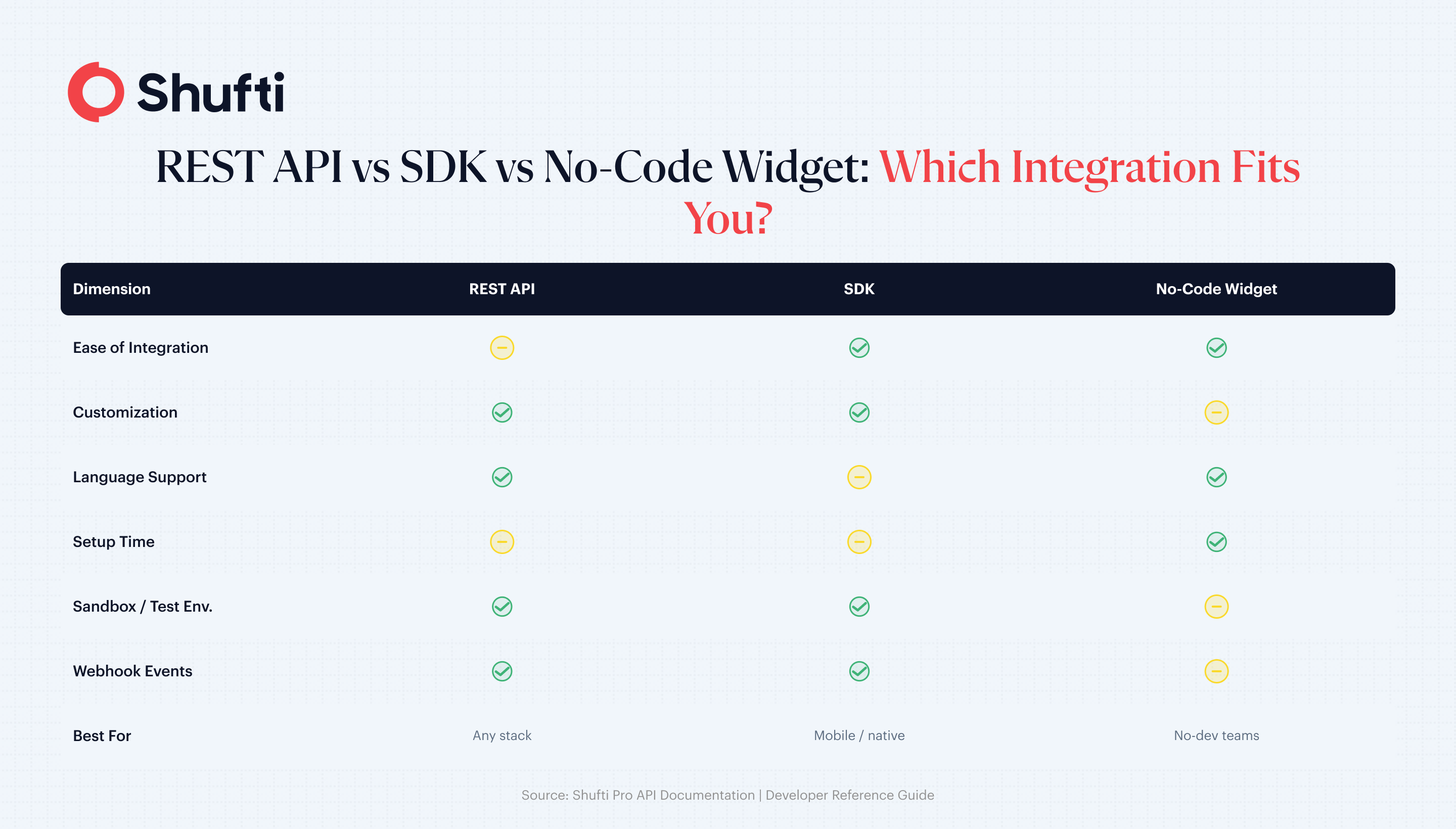
REST API vs SDK vs No-Code Widget: When to Use Each
Three integration paths, three different teams.
- REST API. Full control, server-to-server. Use when you own the capture UX, have native mobile apps with custom flows, or need on-premises deployment.
- Mobile/Web SDK. Pre-built capture UI with edge detection, glare correction, and liveness. Use when you want a tuned capture experience without building it.
- No-code widget (hosted verification link). A URL you email or SMS to the user. Use when engineering capacity is thin or when you need a verification flow for a manual back-office review queue.
Most production teams end up with REST for core flows and the hosted link as a fallback for edge cases.
Authentication and Security
Never call a Document Verification Service directly from a mobile client with a long-lived key. Every reputable provider uses one of:
- Basic auth over HTTPS with a Client ID and Secret Key (server-side only).
- OAuth 2.0 with short-lived bearer tokens for tenanted integrations.
- HMAC requests signing for high-assurance flows.
Pair that with three hygiene controls: rotate API keys on a 90-day schedule, whitelist the egress IPs of your backend in the provider dashboard, and never log the raw Authorization header. Treat document verification keys like payment credentials.
Step-by-Step Integration Walkthrough
Step 1: Get credentials. Create a sandbox account, grab your Client ID and Secret. Full request/response contracts live in the
Shufti API documentation.
Step 2: Send the verification request.
cURL
curl -X POST https://api.shuftipro.com/ \
  -u "$CLIENT_ID:$SECRET_KEY" \
  -H "Content-Type: application/json" \
  -d '{
    "reference": "order_8412",
    "country": "GB",
    "document": {
      "proof": "'"$(base64 -w0 id.jpg)"'",
      "supported_types": ["passport", "id_card", "driving_license"]
    },
    "callback_url": "https://yourapp.com/webhooks/shufti"
  }'
Node.js
import axios from "axios";

const res = await axios.post(
  "https://api.shuftipro.com/",
  {
    reference: `order_${orderId}`,
    country: "GB",
    document: {
      proof: imageBase64,
      supported_types: ["passport", "id_card", "driving_license"]
    },
    callback_url: "https://yourapp.com/webhooks/shufti"
  },
  {
    auth: {
      username: process.env.CLIENT_ID,
      password: process.env.SECRET_KEY
    }
  }
);
Python
import requests
import base64
import os

with open("id.jpg", "rb") as f:
    proof = base64.b64encode(f.read()).decode()

r = requests.post(
    "https://api.shuftipro.com/",
    auth=(os.environ["CLIENT_ID"], os.environ["SECRET_KEY"]),
    json={
        "reference": f"order_{order_id}",
        "country": "GB",
        "document": {
            "proof": proof,
            "supported_types": ["passport", "id_card", "driving_license"]
        },
        "callback_url": "https://yourapp.com/webhooks/shufti"
    }
)
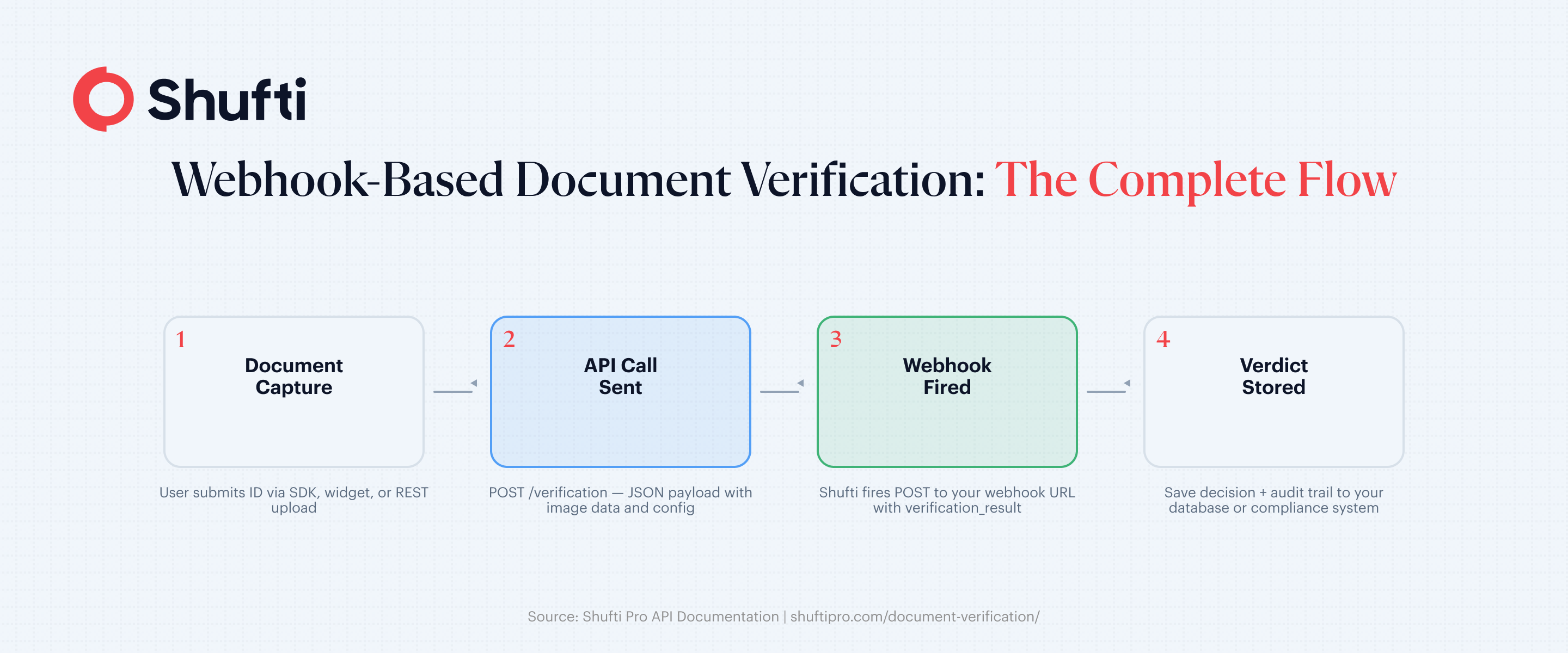
Step 3: Handle the response. The API returns either a synchronous verdict or an event: request.pending status when verification is queued for a deeper check.
Handling Async Flows: Webhooks vs Polling
Webhooks are the default for any automated document verification API. You register a callback_url, the provider signs the payload, and you update your user’s state when the result lands. Verify the signature, make the handler idempotent (retries will happen), and respond with 200 fast, then do the heavy work in a background job.
Polling is the fallback when your network cannot accept inbound traffic (think on-premises banking) or for manual review queues where latency is not critical. Poll the status endpoint with exponential backoff: 2s, 4s, 8s, cap at 30s, give up after 10 minutes.
Use webhooks for UX-critical flows (onboarding). Use polling when the network forces it or the SLA is relaxed.
Error Codes, Retry Logic, and Fallback Flows
Not every failure is a fraud signal. Categorise them:
- Transient (5xx, 429, timeouts): retry with exponential backoff and jitter, max 3 attempts.
- User-recoverable (blurry image, glare, unsupported country): prompt the user to retake.
- Terminal (hard decline, sanctioned document): send to manual review, do not auto-retry.
A sensible fallback chain: auto-verify → manual review queue → human-attended video verification. Never block a user on a transient provider error.
Storing Results Compliantly (GDPR, Data Residency)
You are now holding a biometric template and a government ID. GDPR Article 25 requires data protection by design, which in practice means storing the verification verdict and reference ID in your database and leaving the raw document image with the vendor. If you must retain images, encrypt at rest with a customer-managed key, set a short retention window (30–180 days depending on your jurisdiction), and confirm the data residency region (EU, US, or on-premises) matches your regulatory footprint.
Rate Limits, SLAs, and Uptime
Check three numbers before you sign: requests per second, monthly volume ceiling, and uptime SLA. For a real-time Document Verification Platform, look for 99.9% or higher uptime, sub-15-second P95 latency, and burst capacity that covers campaign spikes. Shufti processes verifications in under 15 seconds with a 99.3% fraud detection rate across 10,000+ document types.
Vendor Evaluation Checklist for Developers
Before committing:
- Document coverage (countries, languages, chip support)
- Deployment options (cloud, on-prem, hybrid)
- Webhook signing and replay protection
- Sandbox quality and sample documents
- SDK size and platform support
- Compliance certifications (SOC 2, ISO 27001, iBeta)
- Clear SLA with credit remedies
- Transparent pricing past the free tier
Ready to start? Book a demo to walk through a sandbox integration with an engineer.
How Shufti Helps You Productionize Document Verification APIs with Confidence
Shufti’s Document Verification API is built for teams that need reliability at every stage of production integration. RESTful endpoints return structured JSON in under 15 minutes, webhook callbacks handle async verification flows without polling overhead, and a sandbox environment that mirrors production exactly means what works at testing holds up at scale.
Coverage spans 10,000+ document types across 240+ countries and territories, so the same integration supports global onboarding without per-market workarounds. When you’re ready to move from pilot to live, dedicated integration engineers are available to work through your specific edge cases, rate limit requirements, and compliance obligations before your first real-user hits the endpoint.
Frequently Asked Questions
How long does a document verification API call take to respond?
A well-tuned automated Document Verification API returns in 5–15 seconds for synchronous checks. Deeper async reviews (manual escalation, liveness re-checks) can take a few minutes and arrive via webhook.
Does a document verification API work in real time?
Yes. Real-time Document Verification is the standard for consumer onboarding. The user uploads the ID, your backend calls the API, and the verdict is returned before the signup flow completes.
How do I handle failed verifications in my API integration?
Split failures into transient, user-recoverable, and terminal. Retry transient errors with backoff, prompt users to retake blurry captures, and route terminal declines to a manual review queue or human-assisted video check.
Can I test a Document Verification API before going live?
Most Document Verification API providers give you a sandbox with test credentials and sample documents. Use it to verify happy paths, webhook handling, and every error code you expect to see.
What data does a document verification API return?
A typical response includes a pass/fail verdict, a confidence score, extracted fields (name, DOB, document number, MRZ), tamper and authenticity signals, and an event status you can map to your internal states.