




 Face Verification
 Address Verification
 Document Verification
 Age Verification
 VideoIdent
 Fast ID
 Docless Verification
 Consent Verification
 NFC Verification
 Business Verification
 Due Diligence
 Investor Verification
 E-Signature

 QES
QES
 AML Screening
 Transaction Monitoring
 Adverse Media
 Business AML Screening
 PEP & RCA
 Sanctions
 Watchlist
 Behavioural Biometrics
 Device Fingerprinting
 Biometric Face Authentication
 MFA
MFA
 Fraud Hub
 Onboarding
 Ongoing Monitoring
 KYC
KYC
 KYB
KYB
 KYI
KYI
 Age Assurance
 Identity Verification
 Workforce IAM
 Candidate Verification
 Compliance
 Fraud prevention
 Trust & safety
 Global expansion
 Product Managers
 Compliance Officers
 Fraud Analysts
 Developers
 Deepfake Detection
 Bonus Abuse / Promotion Abuse
 Account Takeover
 Synthetic Identity Fraud
 Document Fraud
 Impersonation Fraud
 Multi-Accounting
 Fraud Networks
 Chargeback Fraud
 Money Mule Activity
 Party Fraud
 Regulatory & Compliance Risks
 Fintech
 Crypto
 iGaming
 Forex
Forex
 Social Network
 Marketplace
 Banking
 Gig Economy
 Payments
 Ride Hailing
 Adult Content
 Blind Spot Audit
 Deepfake Detector
 Liveness Spoofs
 Document Originality
 Document Deepfake
 Global Trust Platform
 Journey Builder
 Case Management
 Shufti AI
 Fraud Analytics
 Vendor Comparison
 Brand Personalisation
 AI Compliance Co-Pilot
 OCR
OCR
 Secure Capture
 Deployment Options
 Identity Methods
 API Documentation
 Mobile SDKs
 Service Status
 Help Center
 Contact Us
 Technical Support
 Supported Documents
 Supported Countries

 Content library
 Blogs
Blogs
 News
News
 Reports
 Insights
 Knowledgebase
 ROI calculator
 About
About
 Career
 Press Release
 Certifications
 Partnership
 Awards
 Events & Webinar
 Interactive Demo
 Podcast Studio
 Spotlight Studio
How to Build a GDPR-Compliant KYC Onboarding Flow Without Writing Any Code?

TL;DR
- GDPR Article 25 requires privacy protections built into the system design from the start.
- A compliant flow collects only the data AML regulations legally require.
- It captures explicit user disclosure before any verification begins.
- Defined retention and deletion periods apply to every data category.
- Total GDPR fines have crossed 7.1 billion euros as of 2026.
GDPR Article 25 requires every controller processing personal data to build privacy protections into the system design from the start, not patch them on after the product ships. For compliance and product teams running identity verification onboarding, this creates a specific design challenge: the consent gate, the data scope, and the retention schedule all need to be correctly configured before the first customer walks through the flow. Total GDPR fines have crossed €7.1 billion as of 2026 (Kiteworks), with financial services enforcement rising year on year. This article shows how to configure a compliant onboarding flow that satisfies both GDPR and anti-money laundering (AML) obligations, step by step, without writing any code.
A GDPR-compliant KYC onboarding flow is an identity verification process configured to satisfy data protection law alongside your AML obligations. It collects only the personal data that AML regulation legally requires, captures explicit user disclosure before processing begins, and applies defined retention and deletion periods to every data category it handles.
What does GDPR actually require from your KYC flow?
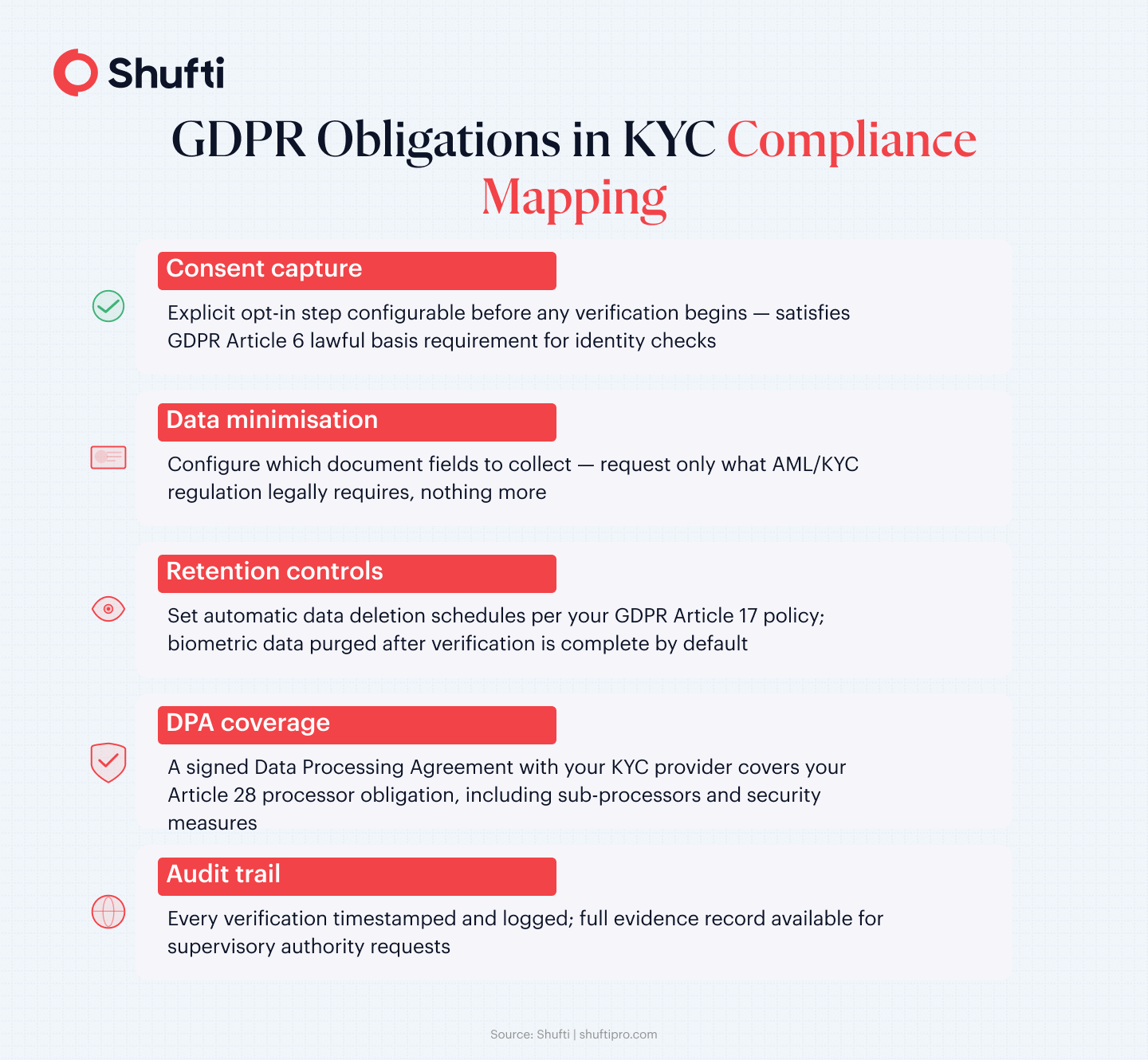
GDPR does not prohibit KYC. It shapes how KYC must be designed. Three articles carry most of the compliance weight for identity verification, and understanding what each one requires is the starting point for building a flow that passes both DPA scrutiny and AML audit. The obligations around lawful basis, data minimisation, and privacy by design operate in parallel, not in sequence.
Lawful basis and the AML overlap
For AML-mandated KYC onboarding, the processing legal basis is typically Article 6(1)(c) of the General Data Protection Regulation (GDPR): processing necessary to comply with a legal obligation. The 6th Anti-Money Laundering Directive (6AMLD) and national AML law provide that obligation. From 2025, the EU AML Regulation also mandates electronic customer identification for new client onboarding, which means a digital verification flow is the expected compliance path, not an optional upgrade (coredo.eu, 2025).
Consent under Article 6(1)(a) plays a different role. The AML check itself does not run on consent, because consent can be withdrawn and identity verification for regulated purposes cannot be made optional. Consent in a KYC flow covers the pre-check disclosure step: the user sees what data will be collected and why, before verification begins. That disclosure is required by GDPR’s transparency obligations under Article 5(1)(a), separate from the lawful basis question.
Data minimisation and the Article 25 default
Article 5(1)(c) limits data collection to what is “adequate, relevant and limited to what is necessary.” Article 25 requires that technical measures default to collecting the minimum dataset, by design, not by policy memo. Together, they mean you cannot request a full driving licence when a passport Machine Readable Zone (MRZ) field satisfies your AML check. The European Data Protection Board (EDPB) Guidelines 4/2019 on Article 25 confirm that “by default” means the system is configured restrictively before anyone touches the settings, not configured broadly and then walked back.
Why do most KYC onboarding flows still fail GDPR audits?
The compliance gap in most onboarding flows has nothing to do with verification technology. Data protection authority findings against KYC implementations tend to cluster around two configuration errors that teams repeat regardless of the tooling they use. Both are avoidable at build time if GDPR constraints are treated as design inputs rather than a post-launch review.
Starting data capture before the disclosure screen
The most common error is presenting the camera prompt before the consent disclosure. A user who uploads their ID document before seeing a clear statement of what data is collected, who processes it, and on what legal basis has not received the pre-check transparency that GDPR Article 5(1)(a) requires. Even where the legal basis for the AML check is a legal obligation rather than consent, the disclosure step still needs to come first. The consent gate is not a legal formality. It is the technical control that makes the rest of the flow lawful.
Running without a tested retention schedule
Article 17 gives data subjects the right to erasure, but AML law overrides that right during the mandatory retention period, commonly five years from the end of the business relationship under 6AMLD, though this varies by jurisdiction. The most common error most flows make is that no deletion schedule was set at configuration time, or the schedule was set but never tested. A flow that has never actually deleted data on schedule is, for audit purposes, a flow without a retention policy.
How to build the flow in five steps?
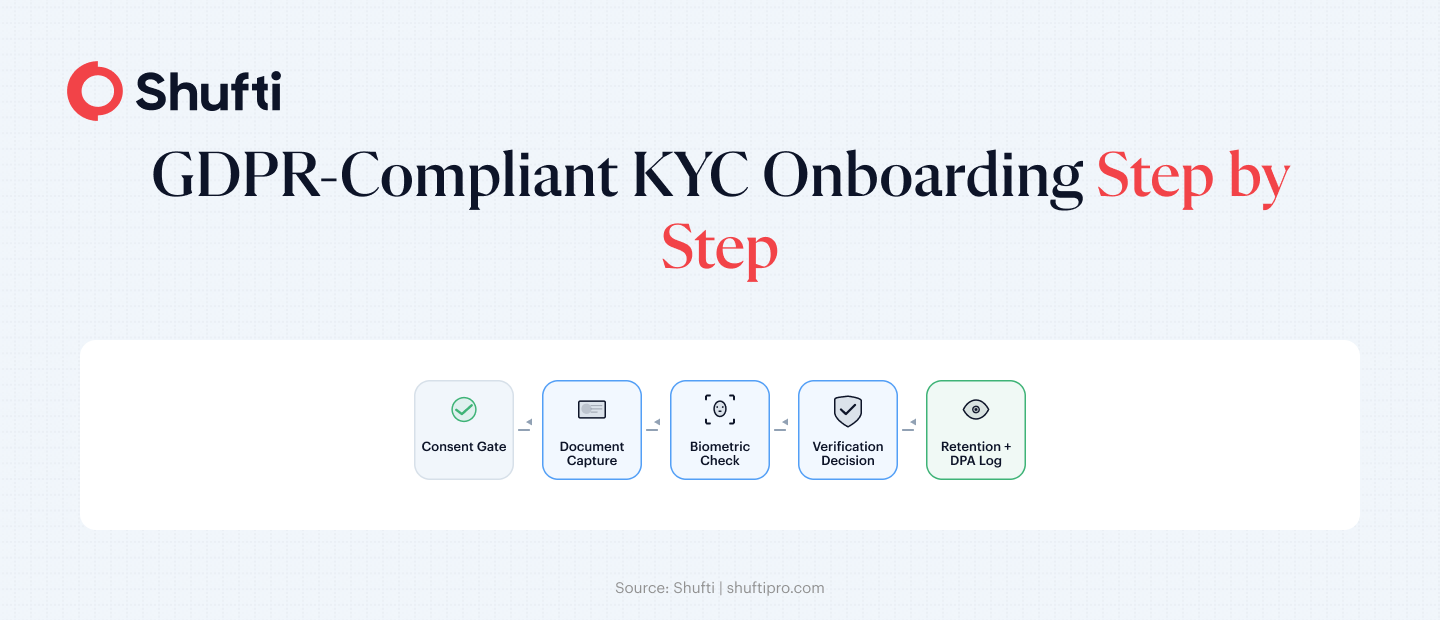
| Step | Action |
| 1. Disclosure screen | Show data, processor, legal basis, retention before capture |
| 2. Restrict fields | Collect only the document fields your AML check requires |
| 3. Set retention | Configure and test automatic deletion before go-live |
| 4. Confirm DPA | Verify the signed Article 28 agreement covers all data categories |
| 5. Build audit log | Write timestamped consent, decision, and deletion entries |
The five steps below translate the GDPR obligations above into a specific configuration sequence. Each step maps to a part of the onboarding process that compliance and product teams can set up using a no-code verification workflow builder without engineering involvement. The specific document types and retention periods will vary by your AML regime, but the configuration sequence applies regardless of industry.
Step 1: Add a disclosure screen before any data capture
The first screen your user sees must be the disclosure screen, not the camera prompt. It should state: what personal data will be collected, who will process it (your organisation and the verification provider as data processor), the legal basis for the processing, and the retention period that applies. The screen does not need to be lengthy. It needs to be accurate. Configure the flow so verification cannot begin until the user has actively acknowledged the disclosure.
Step 2: Restrict the document fields you collect
Map your AML requirements to the minimum document data that satisfies them. For standard customer due diligence (CDD), name, date of birth, document number, and expiry date from a government-issued ID typically cover the requirement. Configure the verification step to collect only those fields, and document the mapping decision in your data protection impact assessment (DPIA) so the scope is auditable if a supervisory authority asks.
Step 3: Set the retention schedule before go-live
Configure the data retention policy before the flow processes its first live check. Set the retention period to match your AML obligation, commonly five years post-relationship-end under 6AMLD. Enable automatic deletion or anonymisation at the end of that window. Then test it in a staging environment: send a test record through, advance the clock to the deletion date, and confirm the deletion runs as configured.
Step 4: Confirm your Data Processing Agreement
Under GDPR Article 28, any third party processing personal data on your behalf must operate under a Data Processing Agreement (DPA). Before routing a live verification through any provider, confirm the DPA is signed and covers the categories of data processed, the processing purposes, the sub-processors used, and the security measures applied. For biometric data, classified as special-category data under Article 9, the DPA should also specify how that data is handled during processing and when it is deleted.
Step 5: Build an audit log into the flow
Every consent record, verification decision, and data deletion event should produce a timestamped log entry. The audit log is your evidence in a supervisory inquiry. Configure the flow to write these entries to a location your compliance team can access directly, without IT involvement, and test that the log writes correctly before you move to production. The log does not need to be complex. It needs to be complete and tamper-evident.
How Shufti help compliance teams configure GDPR-ready onboarding?
Configuring a GDPR-compliant KYC flow through custom code means building the consent screen, the retention logic, and the audit trail as separate engineering projects. For most compliance teams, that means waiting on development sprints that are already full. Journey Builder is Shufti’s no-code verification workflow tool that lets compliance and product teams configure the flow described in this article directly from the dashboard, without opening a single engineering ticket.
The consent step, the document field selection, the data retention schedule, and the audit log are all configurable as distinct elements in the flow. Shufti operates as a GDPR-compliant data processor and provides a Data Processing Agreement that covers your Article 28 obligation, including sub-processor disclosure, processing purpose documentation, and security measure specifications. Biometric data captured during identity verification is deleted after the verification decision completes and is not retained beyond that point by default.
Shufti’s verification covers more than 10,000 document types across 240+ countries, which means the same GDPR-configured flow you build for EU customers runs for your international onboarding within the same retention and consent architecture.
Frequently Asked Questions
What makes a KYC onboarding flow GDPR-compliant?
A GDPR-compliant KYC flow captures a user disclosure before data collection, collects only the personal data your AML obligation legally requires, retains data for the mandated period and deletes it automatically after, operates under a signed Data Processing Agreement with any verification provider, and logs every consent and verification event with a timestamp.
How do I add a consent step to my KYC onboarding flow?
Configure the flow so the disclosure screen loads before the document capture or camera prompt. The screen should state what data is collected, who processes it, the legal basis, and the retention period. The user must actively acknowledge the disclosure before the verification steps can proceed. A no-code flow builder lets compliance teams configure this gate without developer involvement.
What is data minimisation in KYC?
Under GDPR Article 5(1)(c), you can only collect personal data that is adequate, relevant, and limited to what your processing purpose requires. In KYC, that means requesting only the document fields and biometric data your AML policy actually needs, not capturing everything the verification form allows. Article 25 requires that minimum data collection be the system default, not a manual configuration choice.
What should a Data Processing Agreement cover for identity verification?
A DPA for identity verification should specify the categories of data processed, the purposes of processing, the sub-processors the provider uses, and the security measures applied to the data. For biometric data, the DPA should also document how that data is handled during the verification session and confirm it is deleted after the check completes. GDPR Article 28 requires this agreement to be in place before any live data flows through the provider.
How long should biometric data be retained after an identity check?
Biometric data used for liveness and selfie-matching during a verification session should be deleted after the verification decision is recorded, it serves no legitimate purpose beyond that point. Document data retention is governed by your AML obligation, typically five years from the end of the business relationship under 6AMLD in the EU, though jurisdictions vary. Configure both retention periods explicitly at flow setup, not after go-live.