




 Face Verification
 Address Verification
 Document Verification
 Age Verification
 VideoIdent
 Fast ID
 Docless Verification
 Consent Verification
 NFC Verification
 Business Verification
 Due Diligence
 Investor Verification
 E-Signature

 QES
QES
 AML Screening
 Transaction Monitoring
 Adverse Media
 Business AML Screening
 PEP & RCA
 Sanctions
 Watchlist
 Behavioural Biometrics
 Device Fingerprinting
 Biometric Face Authentication
 MFA
MFA
 Fraud Hub
 Onboarding
 Ongoing Monitoring
 KYC
KYC
 KYB
KYB
 KYI
KYI
 Age Assurance
 Identity Verification
 Workforce IAM
 Candidate Verification
 Compliance
 Fraud prevention
 Trust & safety
 Global expansion
 Product Managers
 Compliance Officers
 Fraud Analysts
 Developers
 Deepfake Detection
 Bonus Abuse / Promotion Abuse
 Account Takeover
 Synthetic Identity Fraud
 Document Fraud
 Impersonation Fraud
 Multi-Accounting
 Fraud Networks
 Chargeback Fraud
 Money Mule Activity
 Party Fraud
 Regulatory & Compliance Risks
 Fintech
 Crypto
 iGaming
 Forex
Forex
 Social Network
 Marketplace
 Banking
 Gig Economy
 Payments
 Ride Hailing
 Adult Content
 Blind Spot Audit
 Deepfake Detector
 Liveness Spoofs
 Document Originality
 Document Deepfake
 Global Trust Platform
 Journey Builder
 Case Management
 Shufti AI
 Fraud Analytics
 Vendor Comparison
 Brand Personalisation
 AI Compliance Co-Pilot
 OCR
OCR
 Secure Capture
 Deployment Options
 Identity Methods
 API Documentation
 Mobile SDKs
 Service Status
 Help Center
 Contact Us
 Technical Support
 Supported Documents
 Supported Countries

 Content library
 Blogs
Blogs
 News
News
 Reports
 Insights
 Knowledgebase
 ROI calculator
 About
About
 Career
 Press Release
 Certifications
 Partnership
 Awards
 Events & Webinar
 Interactive Demo
 Podcast Studio
 Spotlight Studio
React Native Identity Verification SDK: Full Developer Integration Guide

-
Add us as a Preferred Source
- 01 Why mobile identity verification belongs in your app
- 02 What does a React Native identity verification SDK actually do?
- 03 What should you look for in a React Native KYC SDK?
- 04 How do you set up and launch the React Native KYC SDK?
- 05 How Shufti handles React Native identity verification
TL;DR
- Shufti’s React Native SDK wraps the complete identity verification flow into a single session.
- It handles camera access, liveness checks, and permissions natively across both iOS and Android.
- Coverage spans 10,000+ document types across 240+ countries and territories.
- Liveness detection is certified to iBeta Level 1, Level 2, and Level 3 Presentation Attack Detection (PAD) standards, providing advanced anti-spoofing protection.
- The Sandbox environment returns production-format responses, allowing callback and integration logic to be tested without rework before going live.
React Native accounts for 8.4% of all developer workflows globally, according to the 2024 Stack Overflow Developer Survey, and it is the preferred framework at many fintech and crypto startups for its cross-platform code reuse. When a compliance requirement arrives in the backlog, the first question from the React Native team is rarely which verification service to choose. More often, it is whether the integration will require writing custom native modules for both iOS and Android from scratch.
The answer depends on the SDK. A well-designed React Native identity verification SDK wraps the full verification flow, handles camera access and platform permissions natively on both platforms, and returns a consistent result object to JavaScript.
This guide covers the integration lifecycle for Shufti’s React Native SDK, from package installation and permission setup through session launch, result handling, and sandbox testing.
Why mobile identity verification belongs in your app
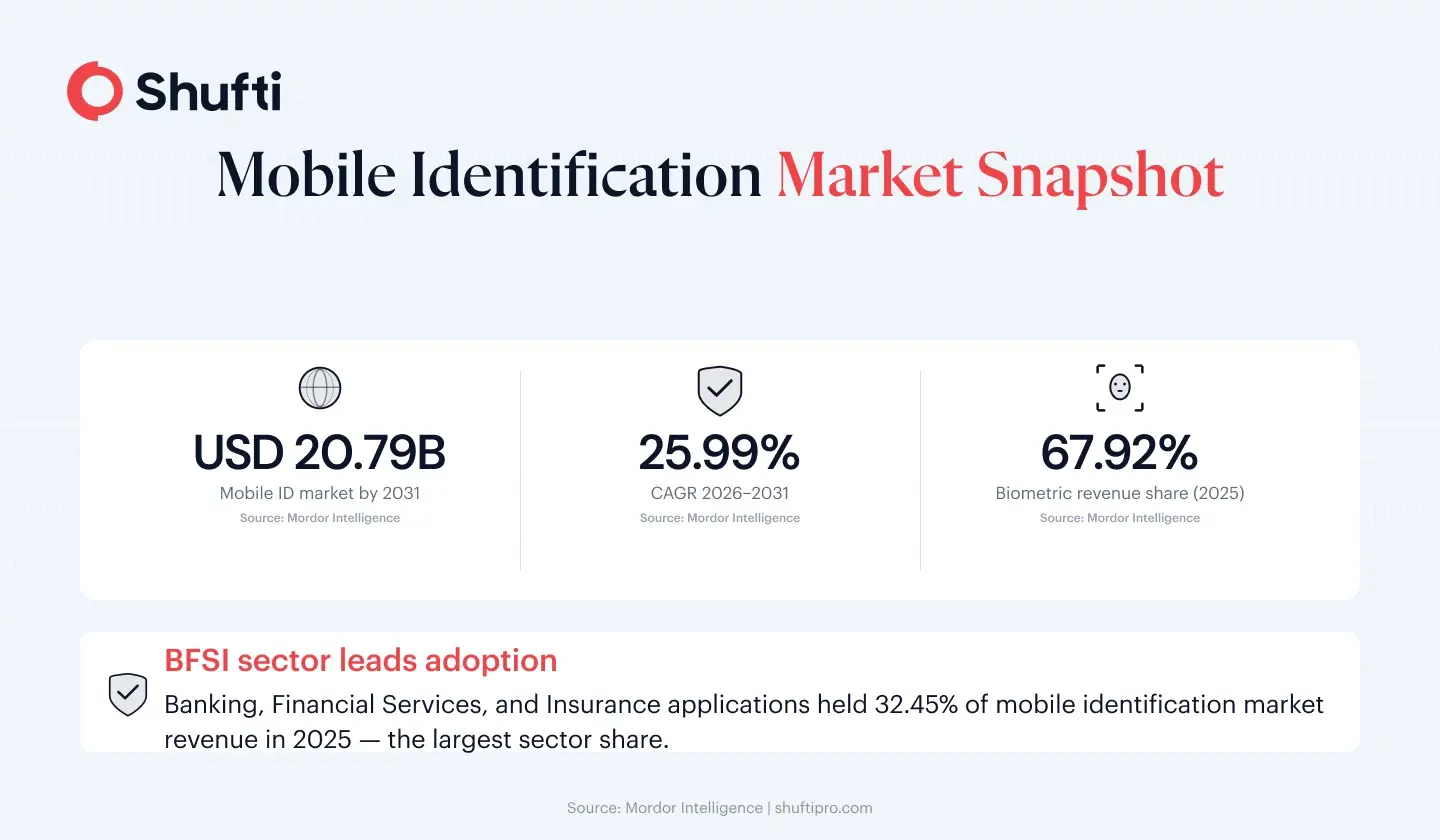
Banking, Financial Services, and Insurance (BFSI) applications lead mobile identification adoption with 32.45% of market revenue in 2025, according to Mordor Intelligence’s Mobile Identification Market report. Multi-factor authentication commands 61.37% of all mobile identification deployments, and biometric technologies generate 67.92% of component revenue that same year. The practical meaning for a React Native developer is concrete. Any app that provides access to financial features or processes regulated transactions will face a requirement to verify the identity of the user behind the request.
The requirements that trigger this come from multiple directions. Know Your Customer (KYC) rules in banking and crypto, Financial Action Task Force (FATF) Recommendation 10 guidelines on customer due diligence, and Anti-Money Laundering (AML) obligations across most regulated markets all converge on the same integration requirement. The app must capture an identity document, run a biometric match against it, and record the result in an audit trail.
Data protection obligations reach the implementation layer as well. As of 2026, General Data Protection Regulation (GDPR) Article 25 requires data protection by design for systems that process biometric data. The choices made at build time determine whether the app’s biometric data handling is defensible during a regulatory review.
What does a React Native identity verification SDK actually do?
A React Native KYC SDK wraps the verification flow inside a native module. When your app calls it, the SDK opens a full-screen session that handles camera management, document framing guides, liveness prompts, image quality validation, and server communication. Your app passes a configuration object, the SDK runs the session, and your registered callback receives a structured result.
The SDK performs three functions that cannot be replicated reliably from JavaScript alone. First, it manages the full camera session lifecycle on both iOS and Android, including permission state, focus, lighting, and capture resolution. Second, it applies the image quality logic required to produce a document image that Optical Character Recognition (OCR) can parse accurately. Third, it communicates with the verification backend and normalises the response so that your callback receives a consistent data structure regardless of the document type or issuing country.
A React Native KYC SDK is not a JavaScript wrapper around HTTP calls. The capture quality logic, liveness detection prompts, and on-device processing that produce accurate pass rates require native code running close to the device hardware. A thin JavaScript fetch layer will produce more edge-case failures and lower first-attempt pass rates than a properly architected native module.
What should you look for in a React Native KYC SDK?
Three capabilities determine whether an SDK will meet the compliance requirements of a fintech, banking, or crypto application across its full user base.
| Capability | Why it matters |
| Document coverage | Narrow libraries cause unsupported-document failures and abandonment |
| Anti-spoofing certification | iBeta Level 1 and 2 is the minimum credible production standard |
| Sandbox parity | Production-format responses avoid reworking callback logic at go-live |
Document coverage determines whether the SDK can attempt verification for your users at all. For a global user base, that means supporting the government-issued IDs, passports, and residence permits from the countries your users actually come from. A narrow document library generates unsupported-document failures at the capture step, before any compliance check runs at all. That failure mode produces support tickets and onboarding abandonment rather than a verification result.
Anti-spoofing certification is the second requirement. Photo printouts and screen replays are documented attack vectors for synthetic identity fraud. An SDK without third-party certified liveness detection is not suitable for regulated use cases. iBeta Level 1 and Level 2 certification from an independent testing laboratory is the minimum credible standard for production deployment.
Sandbox parity separates a usable SDK from a risky one. If the sandbox environment returns response shapes that differ from production, all of the result-handling logic built in development will need rework before the app can go live. A sandbox that returns production-format result objects, including declined and needs-review statuses, lets developers write and verify all callback logic before switching to production credentials.
How do you set up and launch the React Native KYC SDK?
Shufti’s React Native SDK is published as the react-native-shuftipro-kyc npm package. Full integration documentation is at developers.shuftipro.com, including the configuration schema, supported services list, and reference implementations for both platforms. The steps below cover the areas where developers most often lose time during initial setup.
Camera permission configuration
Camera permission must be declared before any verification session can open. For iOS, add NSCameraUsageDescription to your Info.plist with a user-visible reason string explaining why the app needs camera access. On Android, add android. permission.CAMERA to your AndroidManifest.xml and call the PermissionsAndroid.request() method at runtime before the SDK launch call. If the user has previously denied camera permission when your app calls the SDK, the session opens and fails immediately without a meaningful error to the user. Request the permission at a point in the flow that makes the reason contextually clear, such as when the user taps to start the verification step, rather than during app initialisation.
SDK initialisation
Initialise the SDK with your client ID and secret key from the Shufti back office. For development and QA builds, use your sandbox credentials rather than production keys. The sandbox runs against the same API endpoints as production and returns production-format responses, so all integration logic written against sandbox credentials works without modification when you switch to production keys.
Launching a session and handling the result
Pass a configuration object to the SDK launch method specifying which services to run. Available services include document verification, face verification with liveness, and AML screening. The SDK opens as a modal over your current navigation stack. On completion, the SDK calls your registered callback with a result object containing a status field (verified, declined, or needs review), a session reference ID, and extracted document fields for document verification sessions. Build your navigation logic around the status field to route the user to the appropriate next screen.
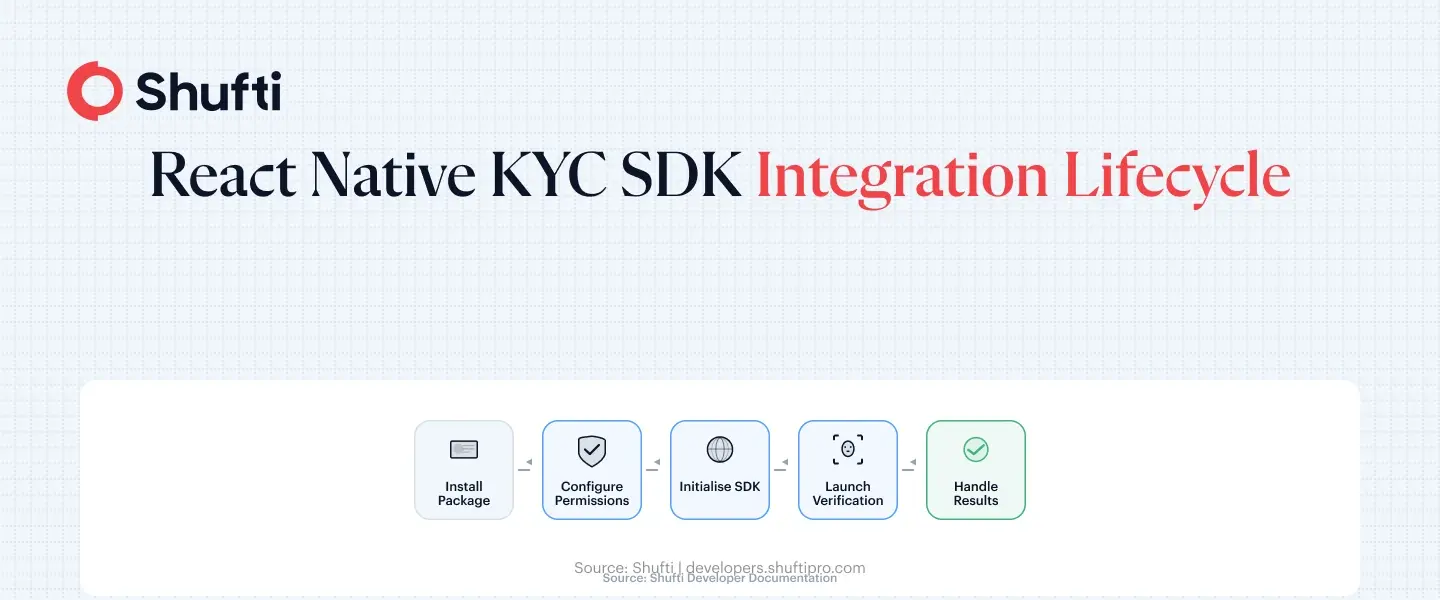
A declined result should route the user to a retry flow or a support path based on your risk policy. Needs-review status means the session requires manual review before a final status is issued. Build both paths in your callback handler before go-live, not after, because both statuses appear in sandbox testing if you configure the sandbox session correctly.
How Shufti handles React Native identity verification
Shufti’s React Native SDK covers identity verification across 10,000-plus document types from 230 countries, and facial biometrics with liveness detection certified to iBeta Level 1 and Level 2 anti-spoofing standards. A standard onboarding flow requiring document capture and a liveness-backed selfie match runs as a single SDK session call. The SDK ships with native iOS and Android binaries that Shufti maintains. Detection model updates deploy on the API side, so accuracy improvements reach your integration without requiring a package update cycle on your end.
For platforms subject to AML obligations, sanctions screening against 3,500-plus global watchlists is configurable in the same session object. A fintech that needs document capture, a biometric liveness check, and a FATF-aligned sanctions screen can configure all three requirements as a single SDK call, without separate vendor integrations.
Sandbox credentials provide access to the full Shufti testing environment, which returns production-format responses including declined and needs-review statuses. Teams that build their callback logic against sandbox data do not encounter response format differences when switching to production credentials.
For teams with data residency requirements, Shufti’s integration options span cloud, on-premises, and hybrid deployment through the same API. The React Native SDK configuration does not change based on the deployment model selected.
The friction that delays most React Native identity verification integrations comes from camera permission handling, result callback parsing, and the absence of a production-faithful sandbox for testing. Shufti’s React Native SDK addresses all three, with document verification, facial biometrics, and AML screening available in a single session and a sandbox environment that returns production-format result objects. Request a demo to run the integration on your own device and validate the full result-handling flow before production go-live.
Frequently Asked Questions
Is Shufti's React Native SDK available on npm?
Yes. The package is published as react-native-shuftipro-kyc on npm. Full documentation, configuration schema, and reference implementations for iOS and Android are available at developers.shuftipro.com.
Does the React Native SDK support both iOS and Android?
Yes. The SDK ships with native binaries for both platforms under a single JavaScript interface. Camera permission declarations and manifest entries are platform-specific, but the launch method and result object structure are identical on both platforms.
How do I handle camera permissions in React Native for KYC?
On iOS, declare NSCameraUsageDescription in your Info.plist. On Android, declare android.permission.CAMERA in your manifest and request the permission at runtime using React Native's PermissionsAndroid.request() method before any SDK launch call. Request it at a point in the flow where the reason is clear to the user.
Can I test the SDK without production credentials?
Yes. Shufti provides a sandbox environment with separate credentials. The sandbox returns production-format result objects, including declined and needs-review statuses, so you can build and test your full callback-handling logic before switching to production keys.
What verification types are available in the React Native SDK?
The SDK supports document verification, face verification with liveness detection, and AML screening. You specify which services run in the configuration object passed to the launch method. Multiple services can be combined in a single session call.
How do I receive verification results in my React Native app?
The SDK calls your registered callback when the session ends. The result object includes a status field (verified, declined, or needs review), a session reference ID, and extracted document fields for document verification sessions. Parse the status field to route the user to the appropriate next screen in your navigation stack.