




 Face Verification
 Address Verification
 Document Verification
 Age Verification
 VideoIdent
 Fast ID
 Docless Verification
 Consent Verification
 NFC Verification
 Business Verification
 Due Diligence
 Investor Verification
 E-Signature

 QES
QES
 AML Screening
 Transaction Monitoring
 Adverse Media
 Business AML Screening
 PEP & RCA
 Sanctions
 Watchlist
 Behavioural Biometrics
 Device Fingerprinting
 Biometric Face Authentication
 MFA
MFA
 Fraud Hub
 Onboarding
 Ongoing Monitoring
 KYC
KYC
 KYB
KYB
 KYI
KYI
 Age Assurance
 Identity Verification
 Workforce IAM
 Candidate Verification
 Compliance
 Fraud prevention
 Trust & safety
 Global expansion
 Product Managers
 Compliance Officers
 Fraud Analysts
 Developers
 Deepfake Detection
 Bonus Abuse / Promotion Abuse
 Account Takeover
 Synthetic Identity Fraud
 Document Fraud
 Impersonation Fraud
 Multi-Accounting
 Fraud Networks
 Chargeback Fraud
 Money Mule Activity
 Party Fraud
 Regulatory & Compliance Risks
 Fintech
 Crypto
 iGaming
 Forex
Forex
 Social Network
 Marketplace
 Banking
 Gig Economy
 Payments
 Ride Hailing
 Adult Content
 Blind Spot Audit
 Deepfake Detector
 Liveness Spoofs
 Document Originality
 Document Deepfake
 Global Trust Platform
 Journey Builder
 Case Management
 Shufti AI
 Fraud Analytics
 Vendor Comparison
 Brand Personalisation
 AI Compliance Co-Pilot
 OCR
OCR
 Secure Capture
 Deployment Options
 Identity Methods
 API Documentation
 Mobile SDKs
 Service Status
 Help Center
 Contact Us
 Technical Support
 Supported Documents
 Supported Countries

 Content library
 Blogs
Blogs
 News
News
 Reports
 Insights
 Knowledgebase
 ROI calculator
 About
About
 Career
 Press Release
 Certifications
 Partnership
 Awards
 Events & Webinar
 Interactive Demo
 Podcast Studio
 Spotlight Studio
Age Verification API: Integration Guide, Endpoints, and Best Practices for Developers
-
Add us as a Preferred Source
- 01 What does an age verification API actually do?
- 02 REST API vs SDK: choosing the right integration approach
- 03 Key API endpoints every age verification integration needs
- 04 How do you handle verification states and sandbox testing?
- 05 Authentication, security, and GDPR data minimisation
- 06 How Shufti helps developers integrate age verification at speed
On 17 January 2025, Ofcom’s age assurance requirements under the UK Online Safety Act 2023 took effect for services displaying pornographic content, with a second enforcement deadline set for 25 July 2025 covering platforms with user-generated content. That timeline hit engineering backlogs directly, and developers who had not yet wired up an age check needed to learn the technical options quickly.
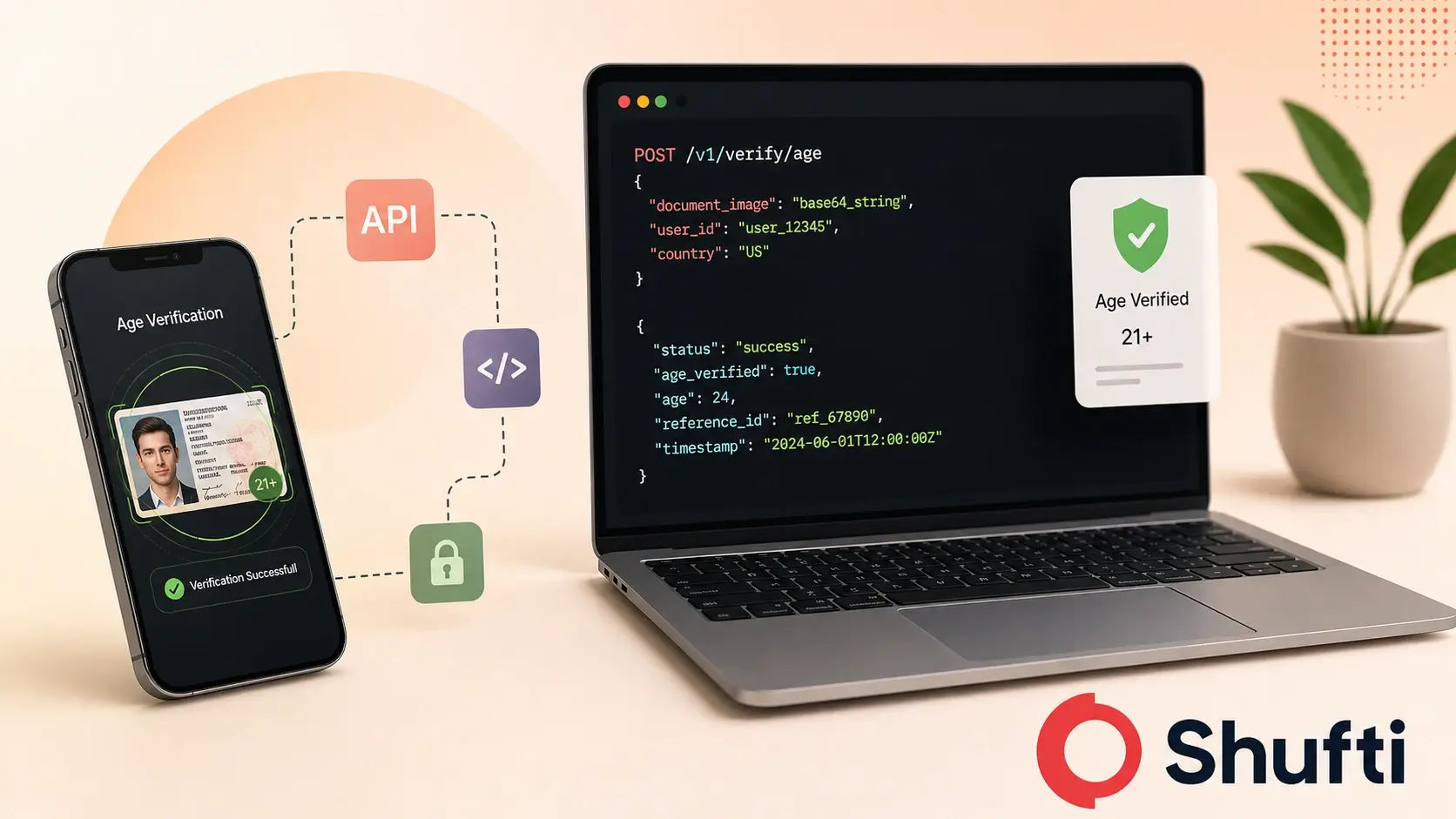
An age verification API lets your application verify a user’s age against a configurable threshold, usually through document scanning, biometric comparison, or facial age estimation. The API call returns a structured result your backend can act on in real time.
Three regulatory timelines are running in parallel right now. Per Ofcom’s guidance on highly effective age assurance, platforms must satisfy four criteria: technical accuracy, robustness, reliability, and fairness. The European Commission published an open-source Age Verification Blueprint on 15 April 2026 as a reference standard for privacy-preserving cross-border age checks under the Digital Services Act (DSA). The integration approach your team picks determines whether you satisfy those criteria from day one.
What does an age verification API actually do?
An age verification API sits between your frontend and a verification engine. When a user submits an ID document, a selfie, or both, the API orchestrates the checks and returns a decision payload your server reads.
The payload typically includes a verification status (pass, fail, or review), the method used such as document, biometric, or estimation, a confidence score where applicable, and a reference ID for the session. Your backend reads the status field and routes the user accordingly.
One distinction matters for compliance: “age verification” and “age assurance” are not interchangeable terms under UK law. Ofcom’s guidance describes age assurance as a broader category that includes probabilistic methods such as facial age estimation, not just document-based identity checks. Most modern age check APIs handle both methods, and the choice between them affects your legal standing in specific markets.
REST API vs SDK: choosing the right integration approach
For most server-side web applications, a REST API call is the correct default. You POST a request to the verification endpoint with the user’s document image or selfie, receive a JSON response, and act on the status field. Setup is language-agnostic and keeps your server in control of the data flow.
Native mobile SDKs add a camera capture layer on top of the API call. Rather than building image capture, compression, and upload logic separately for iOS and Android, the SDK handles all of that and passes a processed payload directly to the verification engine. For apps where liveness detection is a requirement, an SDK is almost always the better path. Passive liveness checks need to control the camera session at a low level, which is more reliable through native code than through a web view.
An iFrame integration is a third option, often used by teams with limited backend resources or compliance urgency. The iFrame renders a hosted verification flow inside your web page, so your server never receives raw biometric data. That separation can simplify GDPR compliance because data handling responsibility sits with the verification provider. The trade-off is reduced control over the user experience.
The choice maps to your use case: server-side REST for flexibility, native SDK for mobile and liveness, iFrame for speed of deployment and data minimisation.
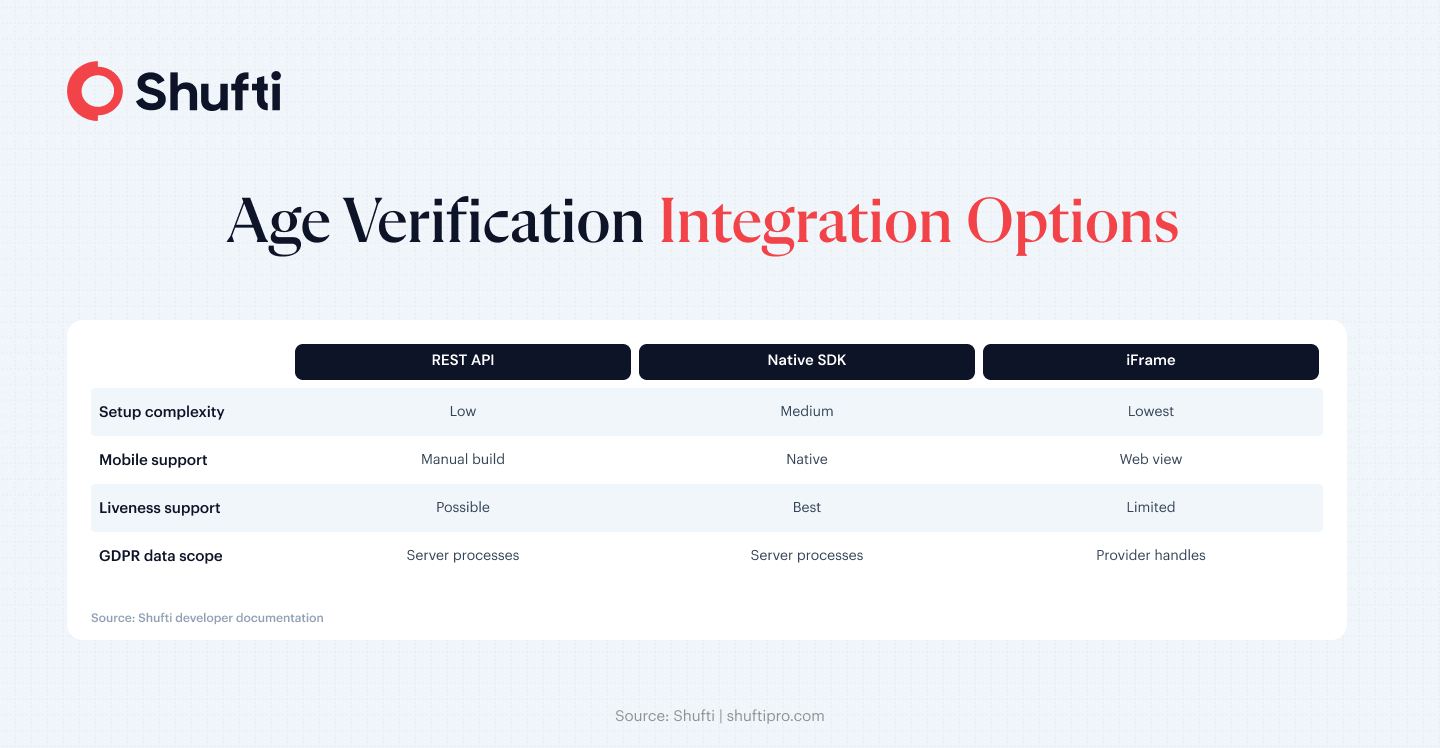
Key API endpoints every age verification integration needs
An age verification API is not a single endpoint but a set of purpose-built routes for different check types. Your integration needs to call the right combination for your compliance requirements.
Document verification endpoint. Accepts an image of a government-issued ID, extracts the date of birth via OCR, and cross-references it against the required age threshold. This is the most legally defensible method under Ofcom’s highly effective age assurance standard because it ties age to a government record.
Facial age estimation endpoint. Accepts a selfie and returns a probabilistic age range based on biometric analysis, with no document required. This endpoint works as a first-pass screen for services where friction must stay low. Facial estimation does not meet the “highly effective” threshold on its own under current Ofcom guidance, but it is a valid first step in a tiered flow. For context on how regulations map to specific endpoint requirements, See our guide to age verification laws and 2025 regulations.
Liveness detection endpoint. Confirms the selfie was captured from a live person rather than a printed photo or screen replay. Pairing liveness with document verification addresses the most common spoofing vector: a stolen ID paired with a static image. For a closer look at the spoofing methods this endpoint blocks, see how minors bypass weak age gates.
Webhook or callback endpoint. Some document checks take extra seconds when a session requires manual review. Register a callback URL with the provider instead of holding a long HTTP connection open. The verification engine sends a POST to your URL when the decision is ready, and your server processes the result asynchronously.
How do you handle verification states and sandbox testing?
Every age verification API response maps to one of three states: pass, fail, or review. A pass signals the check cleared the threshold with the configured confidence. A fail means the user is underage or the document was rejected. A review state means the system could not resolve the check automatically, usually because image quality was too low or the document type was outside the supported library.
Your integration needs explicit handlers for all three states. A frequent mistake is building the pass path and treating fail and review as edge cases. In production, document image quality issues generate a consistent volume of review states, particularly on mobile devices in variable lighting conditions.
Sandbox testing is the right place to validate all three handlers before going live. A sandbox environment mirrors the production API but returns predictable responses using test credentials. Pass a flag in the request header or use dedicated test document sets to trigger specific outcomes. Both fail and review states require clear user-facing messaging, and some jurisdictions require a defined escalation path for unresolved reviews.
Authentication, security, and GDPR data minimisation
Age verification requests carry biometric and identity data, which means API security and data compliance are non-negotiable from the start of the integration.
Every request must be authenticated using either an API key or a short-lived OAuth token. Hardcoded API keys in client-side code are a GDPR risk because they can be extracted and replayed by third parties. Rotating OAuth tokens on a defined schedule is the production-standard approach.
All image payloads must travel over TLS 1.2 or higher. Some regulated industries require end-to-end encryption at the payload level as well.
Data minimisation is the consideration most developers overlook. Under Article 5(1)(c) of the GDPR, request only the checks your service actually needs. Each additional endpoint expands the data surface your organisation is responsible for. The iFrame integration pattern helps here: your server receives the verification result, not the biometric payload itself, which limits what you process and store.
How Shufti helps developers integrate age verification at speed
Shufti’s age verification product runs on a single unified API covering document checks, facial age estimation, liveness detection, and webhook callbacks. Developers do not switch between separate service providers as they add check types. The same authentication credentials and base URL handle every endpoint in the stack.
For document verification, Shufti supports 10,000+ document types across 230+ countries, covering the international ID formats that routinely trip up teams building for global user bases. The liveness detection stack is iBeta Level 1 and 2 certified, independently tested against the presentation attack scenarios most relevant to age fraud. Shufti also holds KJM certification for the German regulated gaming market, where age verification requirements are among the strictest in the EU.
For mobile teams, Shufti provides native iOS and Android SDKs that handle camera capture, compression, and liveness session management. Server-side teams use the REST API. Sandbox credentials and documentation are at Shufti’s developer portal. For a broader view of how the architecture performs, the age verification advantage breakdown covers speed benchmarks, trust signals, and privacy design in detail.
Age verification is now a prerequisite for launching in regulated markets, not a feature teams add after the fact.
A compliant age verification integration requires mapping your regulatory obligation to the right endpoint combination, handling all three verification states in production, and knowing exactly where your GDPR data responsibility ends. Shufti’s age verification API covers the full technical stack through a single integration built for developer teams that need to move fast and comply precisely. Book a demo to get sandbox access and talk through the integration architecture with Shufti’s team.
Frequently Asked Questions
What does an age verification API return?
An age verification API returns a JSON payload containing the verification status (pass, fail, or review), the check method used, a confidence score where applicable, and a unique session reference ID. Your backend reads the status field to route the user or trigger further checks.
How fast is a typical age verification API response?
Document verification typically completes in under 15 seconds for automated checks. Facial age estimation returns results faster, often in 2 to 5 seconds. Sessions routed to manual review take longer and should be handled asynchronously using webhook callbacks rather than a held HTTP connection.
Does the age verification API store user data?
Storage depends on the provider's retention policy and your configuration. Under GDPR, data should only be retained as long as necessary for the verification purpose. Many providers offer configurable retention windows. An iFrame integration means your server never receives the raw biometric data directly, which limits your own data processing scope.
Can I use an age verification API for mobile apps?
Yes. Most providers offer native iOS and Android SDKs alongside the REST API. The native SDK handles camera capture, liveness session management, and image compression, which simplifies mobile integration and produces better image quality for the verification engine than a generic web view.
How do webhooks work in age verification APIs?
You register a callback URL with the verification provider at setup. When an asynchronous check, such as a document session flagged for manual review, reaches a decision, the provider sends a POST request to your callback URL with the result payload. Your server receives the update and processes it without holding an open HTTP connection.