




 Face Verification
 Address Verification
 Document Verification
 Age Verification
 VideoIdent
 Fast ID
 Docless Verification
 Consent Verification
 NFC Verification
 Business Verification
 Due Diligence
 Investor Verification
 E-Signature

 QES
QES
 AML Screening
 Transaction Monitoring
 Adverse Media
 Business AML Screening
 PEP & RCA
 Sanctions
 Watchlist
 Behavioural Biometrics
 Device Fingerprinting
 Biometric Face Authentication
 MFA
MFA
 Fraud Hub
 Onboarding
 Ongoing Monitoring
 KYC
KYC
 KYB
KYB
 KYI
KYI
 Age Assurance
 Identity Verification
 Workforce IAM
 Candidate Verification
 Compliance
 Fraud prevention
 Trust & safety
 Global expansion
 Product Managers
 Compliance Officers
 Fraud Analysts
 Developers
 Deepfake Detection
 Bonus Abuse / Promotion Abuse
 Account Takeover
 Synthetic Identity Fraud
 Document Fraud
 Impersonation Fraud
 Multi-Accounting
 Fraud Networks
 Chargeback Fraud
 Money Mule Activity
 Party Fraud
 Regulatory & Compliance Risks
 Fintech
 Crypto
 iGaming
 Forex
Forex
 Social Network
 Marketplace
 Banking
 Gig Economy
 Payments
 Ride Hailing
 Adult Content
 Blind Spot Audit
 Deepfake Detector
 Liveness Spoofs
 Document Originality
 Document Deepfake
 Global Trust Platform
 Journey Builder
 Case Management
 Shufti AI
 Fraud Analytics
 Vendor Comparison
 Brand Personalisation
 AI Compliance Co-Pilot
 OCR
OCR
 Secure Capture
 Deployment Options
 Identity Methods
 API Documentation
 Mobile SDKs
 Service Status
 Help Center
 Contact Us
 Technical Support
 Supported Documents
 Supported Countries

 Content library
 Blogs
Blogs
 News
News
 Reports
 Insights
 Knowledgebase
 ROI calculator
 About
About
 Career
 Press Release
 Certifications
 Partnership
 Awards
 Events & Webinar
 Interactive Demo
 Podcast Studio
 Spotlight Studio
Top 11 strategies to improve KYC conversion rates

37% of consumers have abandoned a new account application because the process was too cumbersome, according to The Financial Brand’s onboarding research. For compliance teams managing KYC flows, that number describes a concrete business problem. Every abandoned session represents a user who reached your onboarding screen and left before verification was complete.
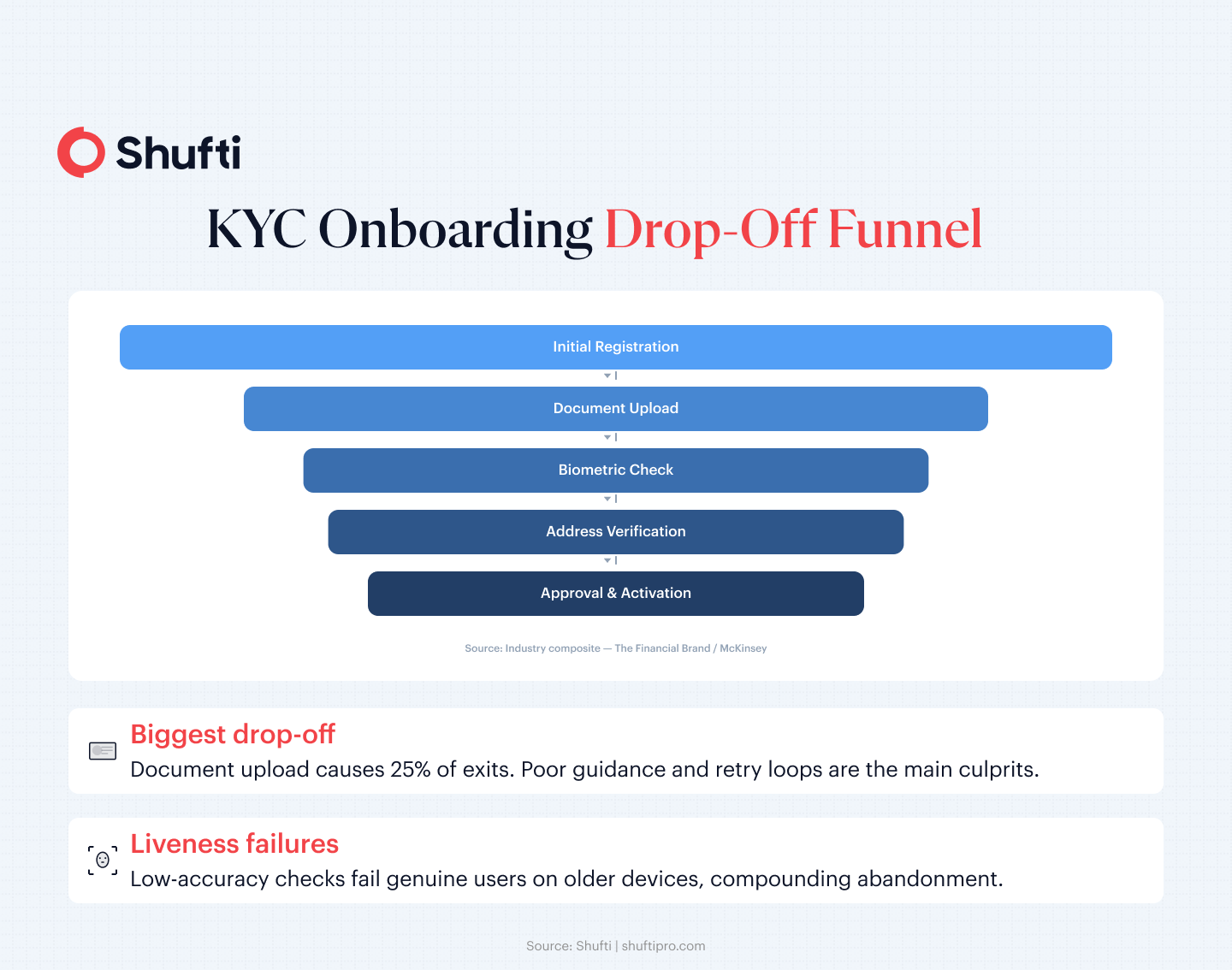
Your KYC (Know Your Customer) conversion rate is the percentage of users who start an identity verification flow and finish it with a verified status. Drop-off is not random. Most abandonment occurs at three predictable steps. Document upload, liveness checks, and address verification account for the bulk of the exits.
The eleven strategies below address each of those friction points directly, covering the technical, operational, and design levers that compliance and product teams can act on today.
What is the KYC conversion rate and why does it matter?
KYC conversion rate sits at the intersection of compliance and growth. Advanced digital banks have reduced onboarding times by up to 85% while onboarding roughly 80% of new clients digitally, according to McKinsey’s analysis of corporate client onboarding.
The gap between those top performers and the average reflects specific architectural decisions. A structured overview of the KYC verification process makes it easier to identify where your own flow diverges from that benchmark, and which of the eleven strategies below will close the distance fastest.
Why do users abandon KYC verification?
Drop-offs follow a funnel with two dominant failure points. Document upload fails when poor capture guidance leads users to submit blurry, clipped, or incorrectly formatted images. The post-verification waiting period fails when the absence of status updates reads as a rejection. Together, these two steps account for a disproportionate share of total abandonment.
McKinsey’s research on digital lending infrastructure found that well-structured digital processes reduced application drop-offs by up to 40%, confirming that the problem is architectural rather than a reflection of user intent. Knowing which specific step has the highest exit rate in your own flow is the starting point for any meaningful conversion work.
11 strategies to improve your KYC conversion rate
The strategies below span technical configuration, user experience (UX) design, and operational process. Some deliver measurable impact within a single sprint. Others require architectural changes but produce improvements that hold across volume increases and market expansions. They are ordered by proximity to the drop-off event, with friction-reduction strategies first and process and analytics improvements following.
1. Apply a risk-based verification model
The Financial Action Task Force (FATF)’s risk-based approach for the banking sector, as revised through the 2025 FATF Recommendations, lets institutions calibrate verification depth to a customer’s assessed risk profile. Low-risk users complete a shorter flow.
High-risk users face enhanced due diligence (EDD). Fewer users hit the friction of a maximal check at onboarding, which lifts conversion without reducing oversight where it matters. This guide on risk-based digital onboarding covers the practical setup logic.
2. Optimise document capture with AI-powered OCR
Most document upload failures trace back to poor lighting, incorrect camera angle, or file compression rather than invalid documents. An optical character recognition (OCR) engine that provides real-time capture guidance, including framing prompts, blur detection, and brightness alerts, before the user submits an image reduces the retry loops that drain patience.
Capture tools that flag problems mid-session convert better than those that return a failure state after submission, because they give the user an actionable path forward instead of a dead end.
3. Build mobile-first verification flows
More than two-thirds of KYC sessions now start on a mobile device, yet many verification flows were designed for desktop and adapted down. A purpose-built mobile flow, with direct camera access, touch-native inputs, and document-capture screens scaled to portrait orientation, removes friction that desktop-ported designs never fully eliminate. If your current flow asks users to upload a file rather than capture it directly, that single requirement is a measurable conversion drag on mobile.
4. Use progressive onboarding
Sign-up screens that demand complete identity data from the first page lose users before they see your product. Progressive onboarding collects the minimum needed to let a user start, then requests additional verification at a natural gate. That gate might be account funding, a first withdrawal, or reaching a transaction threshold. At those moments the user has a clear reason to complete additional checks, and completion rates reflect it.
5. Provide real-time feedback and guided retries
When a document scan fails, the user’s next action depends entirely on the error message they receive. A generic “verification failed” provides no path forward. A specific message, such as “the document edge is cropped in the top-right corner, retake with the full document visible,” gives the user an actionable next step. Guided retries recover a meaningful share of sessions that a hard stop would permanently lose.
6. Choose high-accuracy liveness detection
Liveness checks generate the highest per-step abandonment in a biometric flow, and low-accuracy systems do the most damage at this point. A liveness solution that requires multiple blinks, specific lighting conditions, or repositioning fails a disproportionate share of genuine users on older devices or in low-light environments.
The metric to evaluate is first-attempt success rate, not aggregate system accuracy, because first-attempt failures are the direct driver of drop-off. Understanding how face verification handles liveness accuracy helps when setting performance targets for your own flow.
7. Add multi-channel resume options
Not every user can complete verification in a single session. Device switches, interruptions, and network drops create abandoned sessions that a resume link can recover. Sending a time-bound, tokenised link via SMS or email lets the user pick up exactly where they stopped, on a different device and at a more convenient time, without restarting the flow from the beginning.
8. Pre-fill from external data sources
Manual data entry is error-prone and slow. Where data-protection rules permit, pre-filling fields from a verified external source removes typing friction and reduces mis-keyed information that sends records into manual review queues.
External sources may include credit bureau records, government database responses, or open-banking connections, depending on your operating geography and the data-sharing frameworks available in each market.
9. Run A/B tests on every verification step
No verification flow ships already optimised. A/B testing isolates the impact of individual changes, including button placement, progress indicators, error message wording, and field ordering, without attributing gains or losses to the wrong variable. Set a minimum sample size before reading results and test one change at a time. Incremental improvements compound faster than most teams expect.
10. Monitor drop-off analytics continuously
An overall conversion rate is less actionable than a per-step exit rate. Session-level analytics that record the last completed step for every abandoned user pinpoint which verification stage is causing the most damage. Review these metrics weekly rather than quarterly. Drop-off patterns shift when you change the flow, add a new document type, or push a new software development kit (SDK) version, so stale analytics lead directly to stale fixes.
11. Localise document and language support
A verification flow that accepts a narrow set of document types, or that renders instructions in a single language, turns away users from specific geographies through no fault of their own.
Expanding document coverage to include national identity cards, residence permits, and driving licences from the user’s home country, alongside instruction copy in their language, reduces abandonment driven by document mismatch rather than user intent. What to look for in document verification coverage is a useful reference when assessing the scope of expansion needed.
How Shufti helps you hit your KYC conversion targets
Execution matters as much as strategy. The eleven approaches above depend on the underlying verification platform’s speed, accuracy, and configurability, and those variables differ materially between systems.
Shufti’s identity verification platform completes a full KYC flow in under 15 seconds, with a 95% first-attempt face capture rate. Both figures address the retry loops that strategies 2, 5, and 6 describe. When the platform itself captures cleanly and resolves liveness on the first attempt, a large share of the drop-off problem disappears before any UX redesign is needed.
For teams building risk-tiered flows without a full engineering rewrite, Shufti’s no-code verification workflow builder lets compliance and product teams configure low-risk and high-risk verification paths independently and publish changes without waiting on development cycles. The builder supports 10,000+ document types across 230+ countries, which covers the localisation gap that strategy 11 addresses.
Both capabilities run on a proprietary AI pipeline certified to iBeta Level 1 and 2 for liveness accuracy, with no third-party components in the biometric stack.
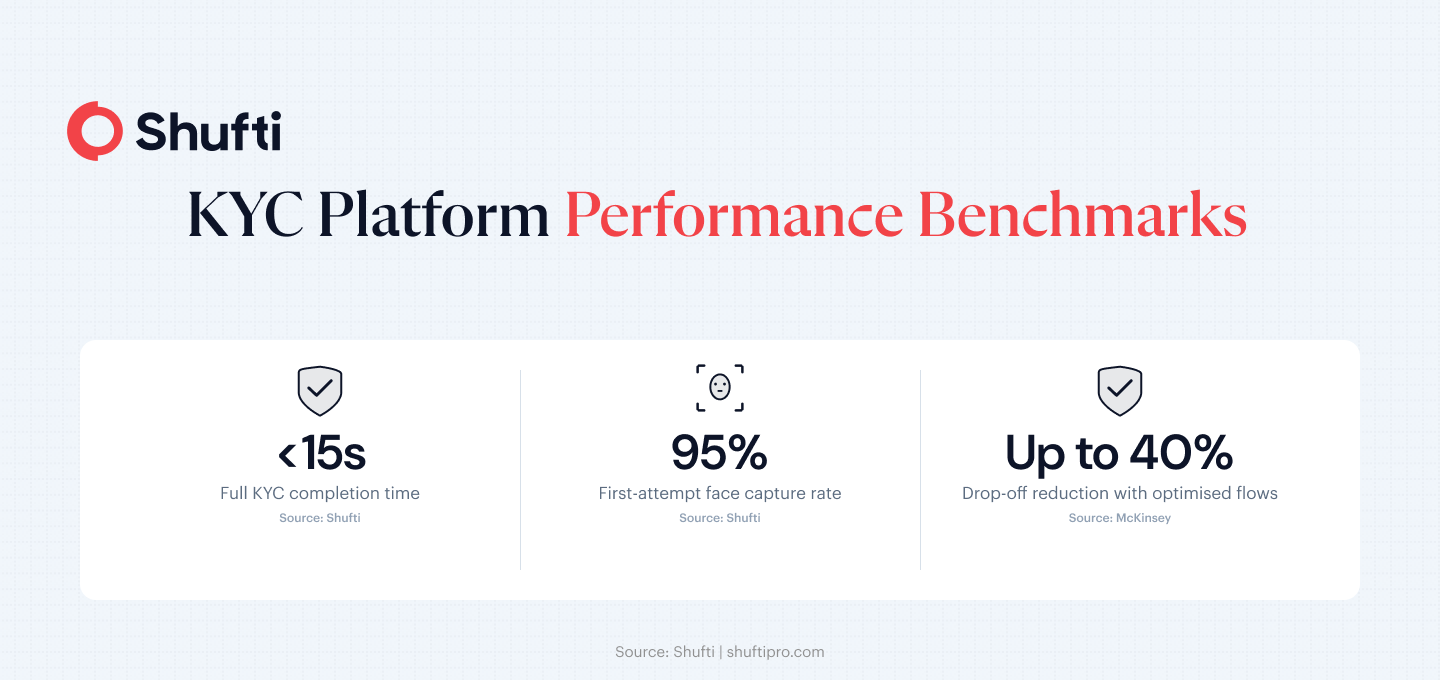
High drop-off rates in KYC verification are an architecture problem rather than a compliance one, and they respond to the specific, measurable changes this article describes. Shufti’s KYC platform executes these strategies at scale, with sub-15-second verification flows, risk-adaptive routing, and no-code workflow configuration your product team can own. Request a demo to see how your current flow compares against these benchmarks and where the highest-impact improvements are.
Frequently Asked Questions
What is KYC conversion rate?
KYC conversion rate is the percentage of users who begin an identity verification flow and complete it with a verified status. A higher rate means fewer customers are dropping out during onboarding. A lower rate signals friction at one or more verification steps that needs to be diagnosed and addressed.
What is KYC drop-off rate?
KYC drop-off rate is the inverse of the conversion rate. It measures the percentage of users who start but do not complete verification. Per-step drop-off tracking is more useful than the aggregate figure because it shows exactly which part of the flow is causing abandonment rather than just confirming that abandonment exists.
Why do users abandon KYC verification?
The most common reasons are unclear document capture instructions, failed liveness checks on lower-end devices, slow or absent feedback after submission, and session interruptions with no resume option. Requiring too much information upfront and supporting too narrow a range of document types also drive abandonment that has nothing to do with user intent.
How can I improve my KYC conversion rate?
Start with the steps that have the highest per-step exit rate in your own analytics. For most deployments that means document capture UX, liveness check accuracy, and real-time error messaging. Apply a risk-based model so low-risk users face fewer steps, and add session-resume options for users who cannot complete in one sitting. Strategies 9 and 10 in this article cover how to measure and iterate from there.
What is risk-based KYC and how does it improve conversion?
Risk-based KYC, as defined in the FATF Recommendations, means calibrating the depth of verification checks to the assessed risk level of the customer. Low-risk customers complete a shorter flow, which reduces friction and improves overall conversion. High-risk customers face additional checks, which keeps the compliance standard intact where it genuinely matters.
What is the average KYC completion rate?
Completion rates vary widely by industry, device type, and flow design. Well-optimised digital onboarding flows typically achieve 55 to 70% end-to-end conversion. Flows with poor mobile design, limited document coverage, or no retry guidance can fall well below that range. Per-step analytics are more useful than industry benchmarks for diagnosing your specific situation.
What UX best practices improve KYC completion?
The highest-impact UX changes are real-time capture guidance during document upload, specific error messages that tell users exactly what to fix, mobile-native screen layouts, and visible progress indicators that show users how many steps remain. Progressive disclosure, collecting less data upfront, also reduces the sense of burden at first contact with the flow.