




 Face Verification
 Address Verification
 Document Verification
 Age Verification
 VideoIdent
 Fast ID
 Docless Verification
 Consent Verification
 NFC Verification
 Business Verification
 Due Diligence
 Investor Verification
 E-Signature

 QES
QES
 AML Screening
 Transaction Monitoring
 Adverse Media
 Business AML Screening
 PEP & RCA
 Sanctions
 Watchlist
 Behavioural Biometrics
 Device Fingerprinting
 Biometric Face Authentication
 MFA
MFA
 Fraud Hub
 Onboarding
 Ongoing Monitoring
 KYC
KYC
 KYB
KYB
 KYI
KYI
 Age Assurance
 Identity Verification
 Workforce IAM
 Candidate Verification
 Compliance
 Fraud prevention
 Trust & safety
 Global expansion
 Product Managers
 Compliance Officers
 Fraud Analysts
 Developers
 Deepfake Detection
 Bonus Abuse / Promotion Abuse
 Account Takeover
 Synthetic Identity Fraud
 Document Fraud
 Impersonation Fraud
 Multi-Accounting
 Fraud Networks
 Chargeback Fraud
 Money Mule Activity
 Party Fraud
 Regulatory & Compliance Risks
 Fintech
 Crypto
 iGaming
 Forex
Forex
 Social Network
 Marketplace
 Banking
 Gig Economy
 Payments
 Ride Hailing
 Adult Content
 Blind Spot Audit
 Deepfake Detector
 Liveness Spoofs
 Document Originality
 Document Deepfake
 Global Trust Platform
 Journey Builder
 Case Management
 Shufti AI
 Fraud Analytics
 Vendor Comparison
 Brand Personalisation
 AI Compliance Co-Pilot
 OCR
OCR
 Secure Capture
 Deployment Options
 Identity Methods
 API Documentation
 Mobile SDKs
 Service Status
 Help Center
 Contact Us
 Technical Support
 Supported Documents
 Supported Countries
 Content library
 Blogs
Blogs
 News
News
 Reports
 Insights
 Knowledgebase
 ROI calculator
 About
About
 Career
 Press Release
 Certifications
 Partnership
 Awards
 Events & Webinar
 Interactive Demo
 Podcast Studio
 Spotlight Studio
KYC in Salesforce: How Compliance Teams Verify Identities Without Leaving Their CRM

TL;DR:
- Most KYC friction in Salesforce comes from tool fragmentation, analysts switching between systems, copying results manually, and maintaining parallel audit trails
- Running identity verification natively inside Salesforce means checks trigger from the record, results write back automatically, and the audit trail never leaves the CRM
- AML screening, document verification, and biometric checks can all run in the same Salesforce flow, with no matching outputs across separate systems
- Salesforce Flows can automate verification triggers based on record conditions, so checks fire on Lead conversion, threshold changes, or periodic review dates without analyst input
- A deep integration writes structured result data to native Salesforce fields, not just a status widget, so outcomes can drive task assignment, pipeline progression, and notifications automatically
Most compliance teams using Salesforce have the same daily friction. A new client lands in the CRM. An analyst opens a separate KYC portal, runs the checks, then manually copies the result back into Salesforce. If AML screening runs in a third system, that means another login and another manual entry. McKinsey’s analysis of KYC operations found that up to 85% of KYC effort is clerical work rather than actual risk judgment. Much of that clerical load comes from fragmented tooling, not from the underlying complexity of the checks.
Running identity verification natively inside Salesforce closes that gap. Checks trigger from the record, results write back automatically, and the audit trail lives in the system that the entire team already uses.
Why compliance teams are moving KYC into their CRM
Salesforce has held the top CRM position by revenue for 12 consecutive years, according to IDC’s 2025 market share rankings. For most financial services firms, it is already the system of record for client relationships. The problem is that KYC processes were built to run outside it.
When verification tools sit in a separate platform, compliance analysts face predictable friction. Verification requests get raised manually. Results arrive in email threads or PDFs. Status updates do not sync with Salesforce Flows or task queues. Escalations require a human to touch the CRM record after checking a different system. For firms running high onboarding volumes, these handoffs accumulate into a bottleneck that slows client acquisition and introduces audit risk.
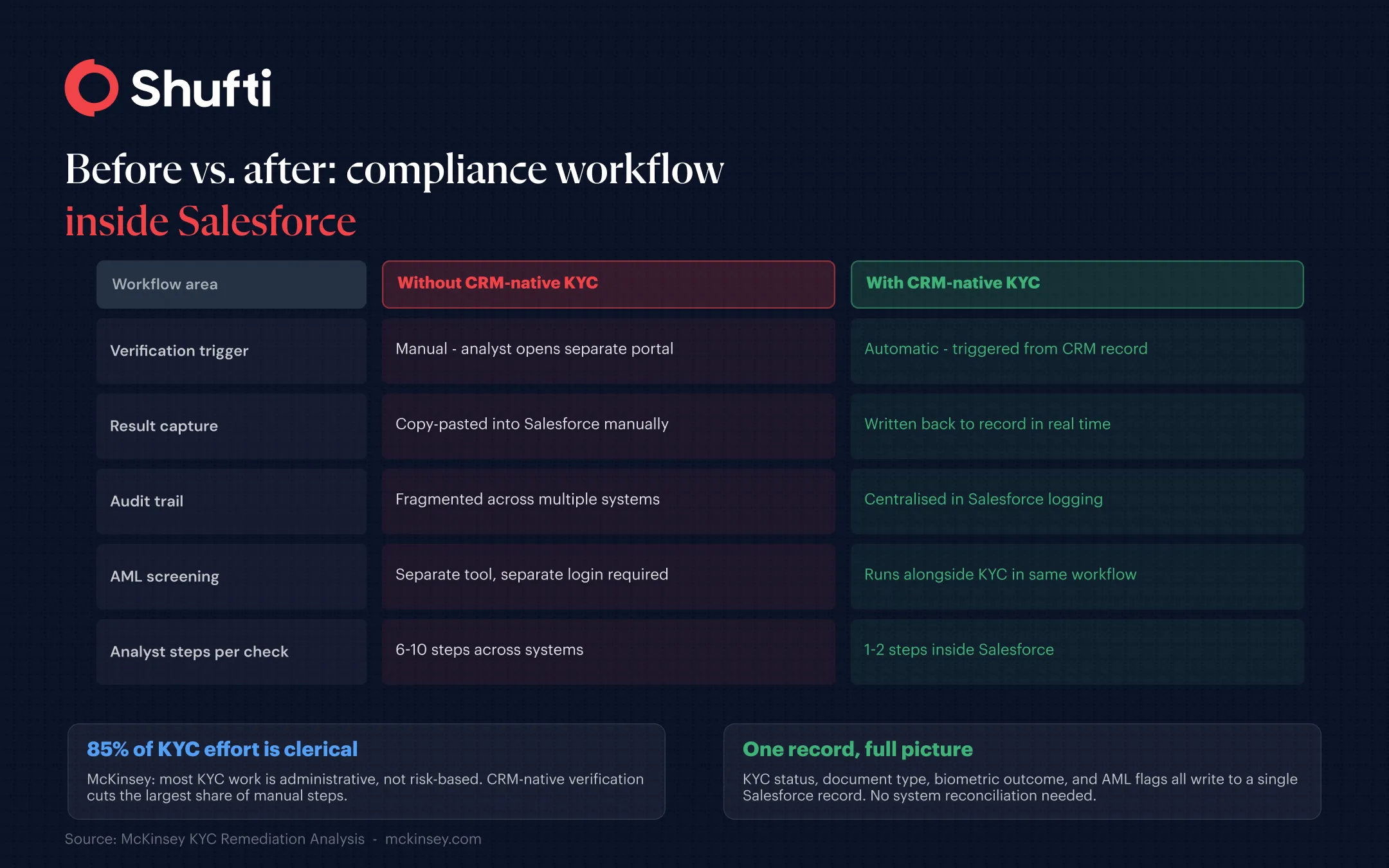
Salesforce Financial Services Cloud includes a native integration path for identity verification and AML screening built into its compliance module. When that path is connected to a verification provider, the full digital onboarding and KYC workflow runs within the CRM, with no manual data transfer between systems.
How KYC verification works inside a Salesforce record?
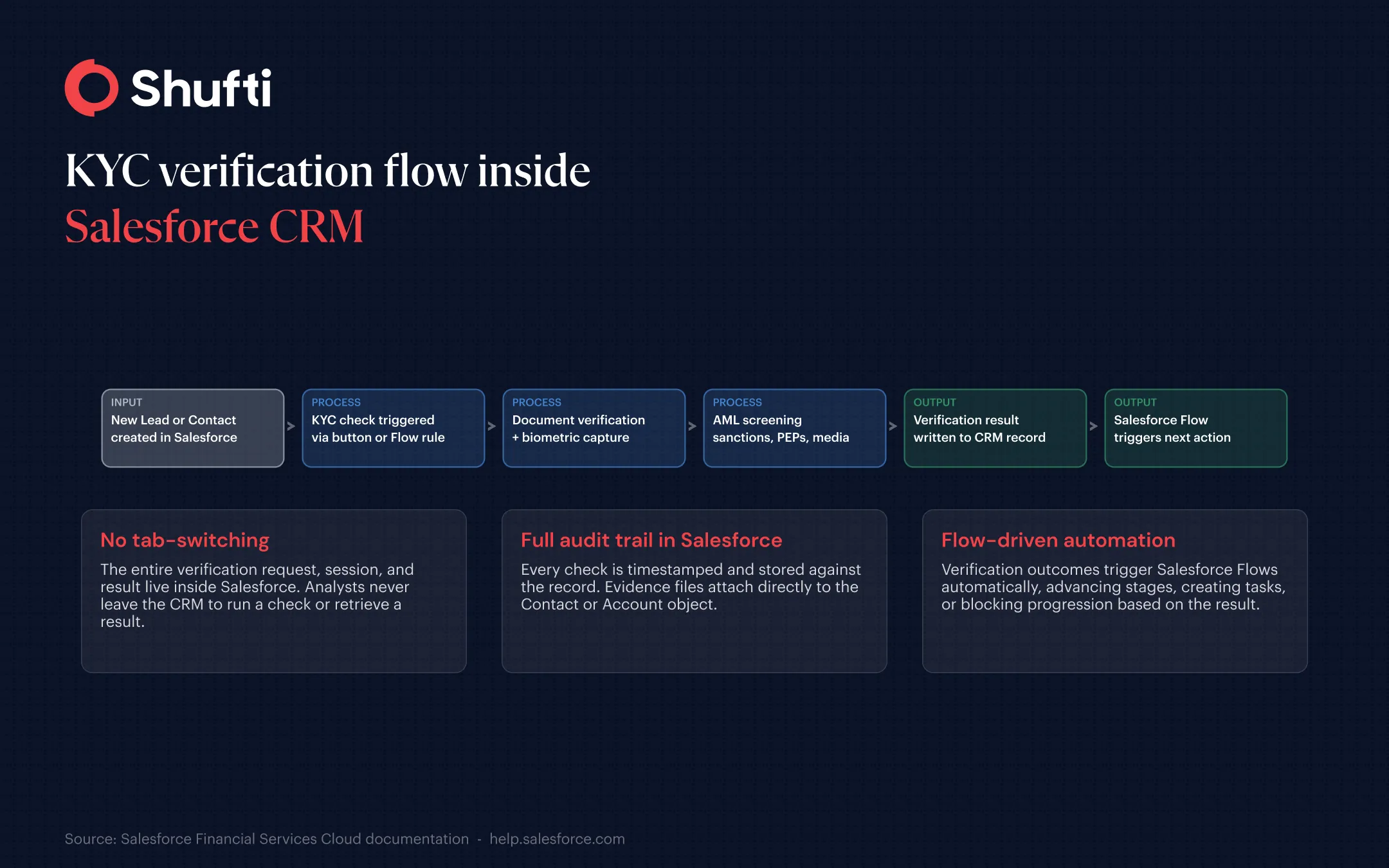
The core mechanic is straightforward. A verification check triggers from a Contact, Lead, or Account record, either by a compliance analyst clicking a button or by a Salesforce Flow rule firing automatically when a record condition is met. That condition might be a new lead stage, a deal value threshold, or a specific field being populated.
The verification session runs. The customer receives a link to complete document upload and biometric capture on their own device. Results return to Salesforce in real time, populating structured fields on the record: verification status, document type confirmed, liveness check outcome, and any risk flags raised.
What verification results look like on the record?
When a check completes, the Salesforce record shows structured result data, not a raw API payload. Fields display the document type verified, the outcome (pass, fail, or manual review), the timestamp, and any specific flags such as an expired document, a mismatched biometric, or a liveness failure. Compliance officers view the evidence directly from the record without opening an external portal.
The result feeds naturally into Salesforce task automation. A pass outcome can trigger advancement to the next pipeline stage. A review flag can generate a task assigned to a senior compliance officer. A fail outcome can block progression and send a notification to the relevant team.
Triggering checks automatically with Salesforce Flows
Salesforce Flows let compliance teams set verification triggers based on record conditions rather than requiring an analyst to initiate every check manually. A flow might trigger a KYC check when a Lead converts, when a financial account reaches a review threshold, or when a periodic review date falls due for an existing client.
Both the trigger and the result live in Salesforce, so verification outcomes feed directly into the broader automation stack, including opportunity routing, task assignment, approval processes, and reporting dashboards. Understanding how ongoing continuous identity monitoring works in practice helps teams set the right trigger logic for periodic reviews, not just initial onboarding.
AML screening and document verification in the same flow
For financial services firms operating under FATF customer due diligence requirements, KYC and AML screening are not separate processes. They run on the same customer, against the same record, and gaps between the two create direct compliance exposure.
The most practical design connects AML screening to the same Salesforce trigger so that sanctions, PEP, and adverse media checks run alongside document and biometric verification. The combined result writes to a single record. Compliance officers do not match outputs from two separate systems.
Document verification in this context covers more than confirming a document is genuine. A well-configured integration reads machine-readable zones, cross-checks expiry dates and nationality fields, and flags inconsistencies between document data and the customer record in Salesforce. Where biometric confirmation is required, a face verification check confirms the person presenting the document matches its bearer, with liveness detection used to rule out static image fraud.
What to look for when connecting a verification provider to Salesforce?
Not all KYC tools integrate at the same depth. A shallow integration surfaces a status field. A deeper integration writes structured result data to native record fields, supports Salesforce Flow triggers on verification outcomes, maintains an audit trail within Salesforce’s own logging, and returns evidence files that can be attached to the record.
The practical requirements to assess:
- Verification results are written to native Salesforce fields on the relevant object, not only to a custom component that requires a separate view.
- Both individual KYC and corporate verification, including UBO checks for business clients, are available through the same integration.
- The provider appears on Salesforce AppExchange and has passed Salesforce’s security review.
- AML screening runs within the same session and writes results to the same record.
- The KYC verification process is configurable to match the firm’s specific requirements, including jurisdiction-specific document types, risk tiers, and periodic review triggers.
Compliance teams evaluating integrations should also consider how AI models handle document analysis and fraud detection within the CRM workflow, since the accuracy of the underlying verification directly affects how often analysts need to step in for manual review.
Compliance teams dealing with fragmented verification workflows lose time on every client onboarding, create gaps in their audit trail, and carry unnecessary manual risk across every record. Shufti’s KYC, AML screening, document verification, and biometric checks run natively inside Salesforce, with structured results written back to the record automatically and Flows triggered based on verification outcomes.
Request a demo to see the full workflow running inside your Salesforce environment.
Frequently Asked Questions
Why run KYC inside Salesforce instead of a separate tool?
When verification runs in a separate platform, results must be manually entered back into Salesforce, which creates audit risk and slows every onboarding. A native integration removes the manual transfer, keeps the full verification record in the CRM, and lets Flows act on outcomes automatically.
Does this work for both individual and business (KYB) verification?
Yes. A Salesforce KYC integration can handle individual identity checks on Contact and Lead records as well as corporate verification on Account records. Business verification typically includes director identification, UBO checks, and entity-level AML screening, all returned as structured data to the relevant Salesforce object.
How are verification results displayed in Salesforce?
Results appear as structured field data on the relevant record: verification status, document type confirmed, liveness outcome, AML flags, and timestamp. Evidence files can be attached directly to the record. Compliance officers review outcomes inside Salesforce without accessing a separate portal.
Can a Salesforce Flow be triggered when verification is complete?
Yes. A connected verification provider returns a result to Salesforce that can serve as a trigger condition in a Flow. A pass result can advance an opportunity stage, a review flag can create a compliance task, and a fail result can block pipeline progression and send a notification. The logic is configurable to match the firm’s workflow.
Is there a native Salesforce app, or does it require custom development?
An AppExchange-listed integration requires configuration, not custom development. Setup involves installing a managed package, connecting API credentials, adding the verification action to the relevant page layouts, and configuring the flows. Most compliance teams complete this without developer involvement.