AMLR Solutions
  AMLR Consultation
 EUDI Wallet
 Onboarding
 Ongoing Monitoring
 FRAML
FRAML KYC
KYC KYB
KYB KYI
KYI Age Assurance
 Workforce IAM
 Candidate Verification
 Account Takeover
 Bonus/ Promotion Abuse
 Chargeback Fraud
 Deepfake
 Document Fraud
 Fraud Networks
 Impersonation Fraud
 Money Mule Activity
 Multi-Accounting
 Party Fraud
 Regulatory & Compliance Risks
 Synthetic Identity Fraud
 Adult Content
 Banking
 Crypto
 Fintech
 Forex
Forex Compliance
 Fraud prevention
 Trust & safety
 Global expansion
 Compliance Officers
 Developers
 Fraud Analysts
 Product Managers
 Journey Builder
  Global Trust Platform
 Customer Profiles
 Vendor Comparison
 IDV Case Management
 AML Case Management
 Regulatory Reporting
 Agentic Rule Builder
  AI Compliance Co-Pilot
  Fraud Analytics
 Fraud Hub
  OCR
OCR Shufti AI
 Bank Account Verification
  Biometric Duplication
 Database Checks
 Document Intelligence
 Government ID
 Mobile Driver's License
 NFC
NFC Selfie Liveness
 Brand Personalisation
 Deployment Options
 Identity Methods
 IDV Modes
 Multi-tenancy
 On-Premise IDV
 Secure Capture
 Shufti MCP






Main Takeaway
- OCR now performs three separate jobs, and one accuracy figure cannot describe all three.
- Character accuracy measures reading. Field extraction measures whether the right value was captured.
- General-purpose OCR reads a forged identity document perfectly, because its text is genuine.
- Europol supported the seizure of roughly 800 forged European documents in Alicante on 27 May 2026.
- Match the solution to the job, not to the highest published accuracy percentage.
On 27 May 2026, a French-led investigation supported by the Spanish National Police and Europol dismantled a counterfeit document workshop in an Alicante apartment, seizing around 800 forged European identity and administrative documents alongside the equipment used to make them. Europol described the operation as evidence of the industrial-scale production methods now used by organised crime groups, a pattern its EU Serious and Organised Crime Threat Assessment 2025 identifies as a key enabler of migrant smuggling and fraudulent legalisation of stay.
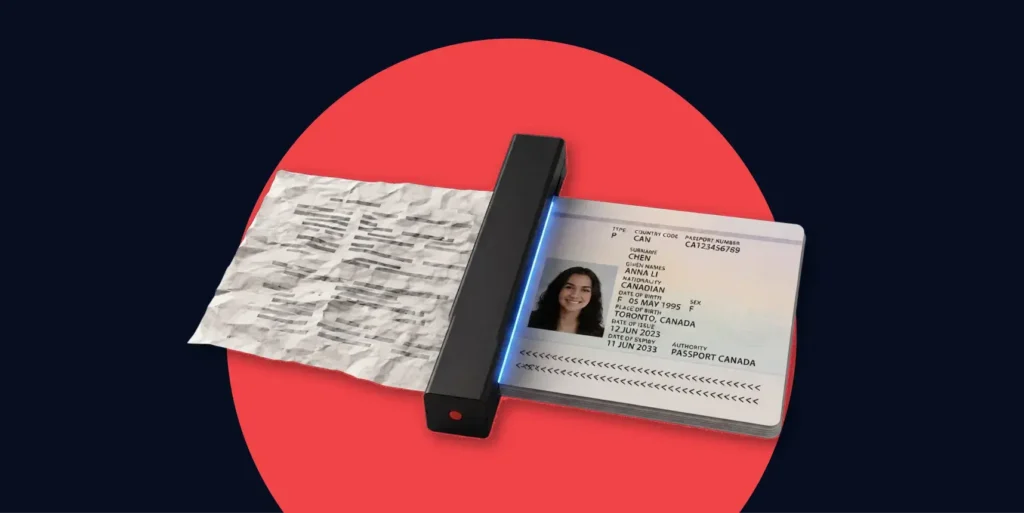
Documents made at that quality present a specific problem to any business looking for OCR software. The text printed on them is clean, well aligned and machine readable. Every OCR engine on this page would transcribe one at close to its headline accuracy, because the characters really are there. The read is successful, but the decision is incorrect.
That’s why we’ve organised this comparison by job rather than by rank.
- Reading text off a page
- Pulling structured fields out of a variable business layout
- Deciding whether an identity document should be trusted
All these are three different problems with three different sets of winners.
The 10 Best OCR Software Solutions in 2026
As the publisher of this guide, we list Shufti first for transparency. The remaining nine solutions are listed alphabetically and described on the same factual basis. Product details are drawn from each vendor’s own public documentation, public repositories, and G2 product profiles, all checked in July 2026.
- Shufti
- ABBYY FineReader PDF
- Adobe Acrobat
- Amazon Textract
- Google Document AI
- Klippa DocHorizon
- Microsoft Azure AI Document Intelligence
- Mistral OCR
- Nanonets
- Tesseract
OCR Software Comparison at a Glance
| Vendor | Primary job | Output | Language and script reach | Authenticity assessment | Deployment | G2 (July 2026) | Best fit |
| Shufti | Identity and address documents inside a verification decision | Structured identity fields plus a forensic verdict | 150+ languages, non-Latin scripts including Arabic, Devanagari, CJK, Ge’ez | Yes, forensic layers run in the same pass | SaaS, private cloud, on-premises, air-gapped | 4.5 / 5 (149) | Regulated onboarding where the document may be forged |
| ABBYY FineReader PDF | Desktop digitisation and PDF editing | Searchable PDF, Word, Excel, layout preserved | Broad, Latin-weighted | Not documented | Desktop, server, on-premises | 4.5 / 5 (295) | Converting trusted archives into editable files |
| Adobe Acrobat | PDF-first document workflows | Searchable and editable PDF | Broad, Latin-weighted | Not documented | Desktop, cloud, API | 4.5 / 5 (4,232) | Teams already standardised on PDF |
| Amazon Textract | Forms and tables at API scale | Text, key-value pairs, tables with coordinates | Latin-weighted, per AWS documentation | Not documented | AWS cloud | 4.3 / 5 (27) | AWS-native extraction pipelines |
| Google Document AI | Document-specific processors | Schema-aligned structured fields | Broad, per Google documentation | Not documented | Google Cloud | 4.2 / 5 (36) | Cloud teams with defined document types |
| Klippa DocHorizon | Intelligent document processing with an ID module | Defined fields including names, dates, IBANs | Per vendor documentation | Partial, EXIF analysis and database cross-checks | Cloud, on-premises option | Not verified | Mid-market IDP with light identity checks |
| Microsoft Azure AI Document Intelligence | Layout-aware extraction on the Microsoft stack | Tables, key-value pairs, custom models | Broad, per Microsoft documentation | Not documented | Azure cloud | 4.4 / 5 (19) | Microsoft-stack teams with varied layouts |
| Mistral OCR | High-throughput document understanding | Markdown or JSON with text, tables, equations | Thousands of scripts and languages, per Mistral AI | Not documented | API, selective self-hosting | Not verified | Very high volume parsing and RAG pipelines |
| Nanonets | No-code IDP for finance workflows | Structured fields and workflow output | Per vendor documentation | Not documented | Cloud | 4.8 / 5 (96) | Finance teams automating invoices without engineers |
| Tesseract | Open-source text recognition engine | Plain text, hOCR, PDF, TSV, ALTO, PAGE | 150+ languages, 35+ scripts | Not documented | Self-hosted, offline | No product listing | Clean printed text at zero licence cost |
Disclaimer: Ratings from G2 product profiles, retrieved July 2026. “Not documented” means the vendor’s public documentation reviewed in July 2026 did not describe document-authenticity or forgery detection as part of the product, which is not the same as the capability being absent. “Not verified” means no G2 product profile with a review count was confirmed at write time. Verify directly with each vendor before procurement.
Every Engine on this Table Reads a Good Forgery Correctly
Shufti verifies 10,000+ document types in active production every month across 240+ countries and territories, and returns a forensic verdict on the page alongside the extracted fields. Run Shufti against your own documents
Best OCR Software for Identity Documents, Where the Page Itself may be Forged
Onboarding is the one OCR job where a perfect read can still be the wrong answer, because the page arriving through the camera is the thing an attacker controls. Shufti leads this segment, with Klippa DocHorizon as a narrower option for teams that want light identity checks inside a broader document-processing platform.
Shufti
Shufti built and owns its optical character recognition engine rather than licensing one, and that engine sits inside the same pipeline that decides whether a document is genuine or not. The company is one of the reasons the term ‘Glocal’ gets used about identity infrastructure, because a single architecture reads a Netherlands passport and a Vietnamese national ID with the same engineering control rather than routing hard markets to a partner.
Extraction Correctness on Real Pages:
The failure that costs the most in onboarding is not a misread character, it is the right character pulled from the wrong place.
Shufti’s engine is trained to resolve which field is which on identity and proof-of-address documents by jurisdiction, so the output is a named set of identity fields rather than a block of text a downstream parser has to guess at.
Reading and Authenticating in One Pass:
Shufti runs its forensic checks on the same image, in the same request, through a pipeline it owns. Document verification at Shufti is a first-party product with no external data-source dependency, so a page that transcribes cleanly but fails forensic inspection is stopped rather than passed downstream with a high confidence score attached. Extraction and authenticity arrive as one verdict rather than two vendors’ outputs stapled together.
Script and Language Reach:
Shufti’s in-house engine reports 99.7% aggregate accuracy across 150+ languages, with published internal benchmarks showing it ahead of Google Vision on Arabic (92.17% against 90.24%), Vietnamese (96.79% against 82.36%) and CJK scripts (86.87% against 82.89%). Shufti states these are internal benchmarks run under standardised conditions against the same document sets, so treat them as vendor-reported rather than independently audited. Coverage extends to Devanagari, Ge’ez, Arabic and Kanji.
| Script | Shufti | Google Vision | Difference |
| Vietnamese | 96.79% | 82.36% | +14.43 pts |
| CJK | 86.87% | 82.89% | +3.98 pts |
| Arabic | 92.17% | 90.24% | +1.93 pts |
Layouts without Market-by-Market Templates:
Ammara Mukhtar has also described the structural problem behind most extraction failures, that documents arrive in different languages, scripts, layouts, formats and quality levels while many onboarding systems still rely on rigid optical character recognition templates built market by market. Shufti verifies 10,000+ document types in active production every month across 240+ countries and territories, a figure describing documents actually processed rather than a lifetime catalogue.
Ownership and Release Cadence:
Because the models are Shufti’s own, a specific country’s new ID series or a newly observed forgery technique can be trained for on Shufti’s release timeline instead of a partner’s.
Deployment Options:
- SaaS
- Private cloud
- On-premises, including air-gapped environments
- Hybrid, with cloud processing for standard volumes and on-premises for sensitive document categories
Certifications and Recognitions:
- SOC 2 Type 2
- ISO 27001:2022
- PCI DSS
- Cyber Essentials Plus, GDPR and CCPA compliance
- Pipeline mapped to FATF Recommendation 10, the EU 5th and 6th AML Directives, and eIDAS 2.0 document authentication standards
Ratings (as of July 2026):
- Shufti G2 Reviews: 4.5 / 5 (149 reviews)
The Honest Trade-Off: Shufti is not a general-purpose OCR engine and should not be shortlisted as one. It will not digitise a warehouse of contracts, scan a book, or convert an invoice archive into spreadsheets, and there is no published per-page rate to compare against the cloud APIs, since pricing is quoted per deployment. On raw throughput and unit cost for trusted documents, several solutions below win outright.
Verdict: The strongest choice for regulated onboarding, where the optical character recognition output feeds a compliance decision, and the document itself is part of the attack surface.
Klippa DocHorizon
Klippa DocHorizon is a Netherlands-based intelligent document processing platform spanning business and identity documents in one product. Per Klippa’s own documentation, it handles more than 50 document types including invoices, receipts, ID cards, passports and contracts, supports custom model training, and lets teams define the fields to extract such as names, dates, addresses and IBANs.
Authenticity Assessment: Klippa documents a fraud detection capability that analyses EXIF metadata and cross-checks against databases, a meaningful step beyond pure extraction though narrower than a full forensic pipeline.
Verdict: A reasonable fit for mid-market teams that mostly process business documents and want identity checks available in the same platform rather than as a separate integration.
Best OCR software for Digitising Documents you already Trust
Archive conversion is the original OCR job and the one where desktop and open-source options still beat the API vendors on cost. ABBYY FineReader PDF, Adobe Acrobat and Tesseract are the practical shortlist.
ABBYY FineReader PDF
ABBYY has been in text recognition longer than most of this list, and FineReader remains the reference point for converting scanned pages into searchable PDFs and editable Word or Excel files with the original layout preserved. It carries 4.5 / 5 from 295 G2 reviews, the deepest review base of any dedicated OCR product here, with reviewers repeatedly citing ease of installation and a shallow learning curve. ABBYY’s separate FlexiCapture and Intelligent Document Processing lines add template-based field extraction with confidence scoring and human review, rated 4.2 / 5 from 33 G2 reviews.
Verdict: The default for teams converting trusted archives into editable files without writing code.
Adobe Acrobat
Adobe Acrobat carries OCR as one feature inside a PDF platform rather than as its reason for existing, which is exactly why it suits organisations already standardised on PDF. It holds 4.5 / 5 from 4,232 G2 reviews, by far the largest sample in this comparison, and integrates natively with Microsoft 365, Google Drive, Dropbox, Box and OneDrive, with an API available for custom work.
Verdict: Best where OCR is an occasional need inside document workflows a team already runs on Acrobat.
Tesseract
Tesseract is the open-source engine most technical evaluations start from, released under the Apache 2.0 licence and maintained on GitHub, with official language model data covering more than 100 languages and 35 or more scripts. Since version 4 it has used an LSTM-based recogniser, and it outputs plain text, OCR, PDF, TSV, ALTO and PAGE. Its documented weakness is layout understanding, since it was not designed for reliable table extraction or form parsing, and it ships with no graphical interface.
Verdict: The right answer for clean printed text at zero licence cost, and the wrong one for complex layouts or anything adversarial.
Best OCR Software for Developers Building Extraction into a Product
Extraction inside a product is an infrastructure decision, and for most teams the deciding factor is which cloud the rest of the stack already runs on. Amazon Textract, Google Document AI, Microsoft Azure AI Document Intelligence and Mistral OCR cover the field.
This is where the integration question gets answered in practice. All four expose REST APIs and SDKs, so extraction runs server-side in your own backend and results land in your database through the same pipelines that handle any other API response.
Amazon Textract
Textract extracts printed text, handwriting, key-value pairs, and tables with positional coordinates, and its signature detection and table handling make it a common pick for contracts and forms. It holds 4.3 / 5 from 27 G2 reviews, where reviewers praise AWS integration and flag cost at volume.
Verdict: The obvious choice for teams already building on AWS.
Google Document AI
Google Document AI pairs OCR with document-specific processors, so the output arrives as fields aligned with a schema rather than raw text, and custom labelling is available when standard processors do not fit a document type. It carries 4.2 / 5 from 36 G2 reviews, the lowest rating in this segment, with reviewers rating product direction highly and ease of use less so.
Verdict: Suits Google Cloud teams with a small number of well-defined, high-volume document types.
Microsoft Azure AI Document Intelligence
Azure AI Document Intelligence offers prebuilt and custom models with layout-aware extraction of tables and key-value pairs, and its main argument is depth of integration with the rest of Azure. It holds 4.4 / 5 from 19 G2 reviews, a small sample weighted towards enterprise reviewers.
Verdict: Strongest for Microsoft-stack teams whose document layouts vary by domain.
Mistral OCR
Mistral OCR is the throughput and unit-cost leader on this page, and it is worth saying so plainly. Per Mistral AI’s own product announcement, it processes up to 2,000 pages per minute on a single node at roughly 1,000 pages per dollar through the API, with about double that under batch inference. It understands text, tables, media, and equations together, outputs Markdown or JSON, and is selectively available for self-hosting where data cannot leave a network. No G2 product profile with a review count was confirmed at write time.
Verdict: The pick for very large document repositories and multimodal RAG pipelines, where speed and cost per page dominate.
Best OCR Software for Variable-Layout Business Documents
Invoices and receipts arrive in hundreds of layouts from hundreds of suppliers, which breaks any approach built on fixed templates. Nanonets, Klippa DocHorizon and ABBYY are the established answers.
Nanonets is the highest-rated product in this comparison at 4.8 / 5 from 96 G2 reviews, with reviewers highlighting a model that learns from corrections instead of needing templates written up front, and G2 scoring its data extraction at 9.6 and integration at 9.4. Reviewers note it lacks native mobile capability. Klippa covers similar ground with custom model training and defined output fields, while ABBYY’s FlexiCapture line brings confidence scoring and structured human review for teams that need an auditable correction path.
Verdict for the Segment: Nanonets for finance teams automating without engineering support, ABBYY where a formal human-in-the-loop review trail matters.
Best OCR Software for Non-Latin Scripts and Emerging Markets
Language counts are the most misleading number in OCR procurement, because a solution advertising 100 languages may read English at 99% and a lower-resource script far below that. Shufti leads this segment, with Mistral OCR as an option for general text in mixed-script documents.
Yes, OCR software supports multiple languages, but support is not a binary. Training data is abundant for English, Spanish, French, German, Chinese, Arabic, and Japanese, and it thins out quickly for regional variants and minority scripts, where accuracy quietly collapses. The only figures worth acting on are per-script, on your own documents.
Shufti publishes exactly that breakdown. Against Google Vision on identical document sets, its internal benchmarks report 96.79% against 82.36% on Vietnamese, 92.17% against 90.24% on Arabic, and 86.87% against 82.89% on CJK, sitting inside a 99.7% aggregate across 150+ languages. Devanagari, Ge’ez, Arabic, and Kanji are covered, and the models were trained on those documents from the start rather than retrofitted after a Latin-first engine hit its limits. Stephen Geerman, Managing Director and Founder of Shufti reseller partner Axioma in Aruba, put the practical consequence in blunt terms when explaining the selection. “Coverage, the broad worldwide coverage that Shufti has, was very important for us. Other competitors are not able to read or verify local IDs from here, or passports from the region.”
Test the Scripts your users Actually Carry
Shufti verifies 10,000+ document types across 240+ countries and territories in active production every month, including the non-Latin IDs many engines treat as edge cases. See the full supported-documents list
What to Look for in OCR software in 2026
Six criteria separate a real shortlist from a list of accuracy percentages. They are the criteria this comparison applies to every solution above, and they answer the question of what businesses should look for.
-
Output Type: Raw Text or Named Fields
Raw text extraction hands back a wall of characters and leaves your team to work out which number is the total and which date is the expiry. Structured extraction returns named fields. The difference decides how much engineering sits downstream of the OCR call, and it is usually a higher cost than the OCR licence.
-
Extraction Correctness, Not Character Accuracy
Character accuracy answers whether the engine read what was printed. Extraction correctness answers whether it picked the right value from a page carrying several candidates. A document with three addresses on it produces perfect character accuracy and a rejected customer at the same time, and only the second number shows up in your pass rates.
-
Script Reach, Measured Per Script
Ask for accuracy broken down by the scripts your users actually present, not an aggregate. An aggregate figure is dominated by whichever language supplied most of the test set.
-
Layout Handling Without Market-by-Market Templates
Template-based extraction works until a layout changes, then it fails silently. Layout-independent understanding costs more and survives contact with real document variety, which matters most where document series are reissued frequently.
-
Whether Authenticity is Assessed at All
Most OCR solutions answer what the page says. Very few answer whether the page should be believed. If the documents arriving are supplied by the person being checked, these are two separate procurement questions and only one of them is on most vendors’ feature lists.
-
Deployment, Residency and Integration
Cloud APIs are the fastest path to production and the hardest to reconcile with data-residency obligations. On-premises and air-gapped options cost more to run and are the only workable answer under some regimes. Check the API, the SDKs and the residency options together.
How we evaluated best OCR Softwares
Every solution above was assessed against the same six criteria: output type, extraction correctness, per-script reach, layout handling, authenticity assessment, and deployment plus integration.
Evidence was held to two tiers. Tier 1 is the vendor’s own primary documentation, official product announcements, or public repositories. Tier 2 is a dated third-party source, which here means G2 product profiles cited with their review counts. Marketing summaries, other comparison articles and undated claims were not used. Where a claim could not be verified to either tier, the table records “not verified” rather than an assertion.
Two exclusions are deliberate. Trustpilot says nothing useful about a developer API or an open-source engine, so it is left out. Liveness credentials such as iBeta conformance under ISO/IEC 30107-3 are left out of the criteria too, because they measure presentation-attack detection on faces rather than anything about text extraction, and importing them would flatter identity vendors on a test this category does not sit for.
All vendor pages, repositories and G2 profiles were last checked in July 2026. Ratings and capabilities move, so re-check each before procurement.
Why the best OCR software depends on your business or use case
The right solution is the one that matches the job, the documents, and who supplies them. Four situations cover most buyers.
Scenario 1: You are onboarding customers under a compliance obligation
Shufti is the fit here, because the OCR output feeds a decision a regulator may later ask you to justify, and the document is supplied by the person being checked. Extraction and forensic assessment arriving as one verdict from one owned pipeline gives a single audit trail and a single accountable vendor when something is missed. Klippa DocHorizon is a narrower option where identity documents are a small share of a much larger business-document workload.
Scenario 2: You are digitising an archive you already trust
Shufti is the wrong answer for this and the general-purpose engines are the right one. ABBYY FineReader for editable output with preserved layout, Adobe Acrobat where PDF is already the standard, Tesseract where the text is clean and licence cost matters more than layout handling.
Marketing pages do not reveal the right OCR software. Your own documents do. The procurement question is which of the three jobs you are actually buying for, how much of your document variety the engine has genuinely seen, and whether anyone in the stack is checking that the page deserves to be believed. For teams whose answer to that last question is nobody, and whose documents arrive from the people being verified, Shufti’s combination of owned extraction, forensic assessment in the same pass, per-script benchmarks and full deployment flexibility is the broadest single-vendor answer. One glocal platform. The full compliance lifecycle, from sign-up to remediation. Every industry, every region, every use case.
Frequently Asked Questions
What features should businesses look for in OCR software?
Look for structured field output rather than raw text, accuracy reported per script rather than as an aggregate, layout handling that does not depend on templates, and deployment options matching your data-residency obligations. If documents come from the person being verified, add document-authenticity assessment.
Does OCR software support multiple languages?
Yes, though support varies sharply by language. Most solutions cover 100 or more languages, but accuracy is highest for well-resourced languages such as English and Spanish and drops for minority scripts. Shufti reports 99.7% aggregate accuracy across 150+ languages, with per-script figures published for Arabic, Vietnamese and CJK.
Can OCR software integrate with existing business systems?
Yes. Cloud services including Amazon Textract, Google Document AI and Azure AI Document Intelligence expose REST APIs and SDKs, Shufti offers APIs and mobile SDKs, and Tesseract can be embedded directly. Desktop products such as Adobe Acrobat integrate through storage connectors and an API.