


 Face Verification
 Address Verification
 Document Verification
 Age Verification
 VideoIdent
 Fast ID
 Docless Verification
 Consent Verification
 NFC Verification
 Business Verification
 Due Diligence
 Investor Verification
 E-Signature

 QES
QES
 AML Screening
 Transaction Monitoring
 Adverse Media
 Business AML Screening
 PEP & RCA
 Sanctions
 Watchlist
 Behavioural Biometrics
 Device Fingerprinting
 Biometric Face Authentication
 MFA
MFA
 Fraud Hub
 Onboarding
 Ongoing Monitoring
 KYC
KYC
 KYB
KYB
 KYI
KYI
 Age Assurance
 Identity Verification
 Workforce IAM
 Candidate Verification
 Compliance
 Fraud prevention
 Trust & safety
 Global expansion
 Product Managers
 Compliance Officers
 Fraud Analysts
 Developers
 Deepfake Detection
 Bonus Abuse / Promotion Abuse
 Account Takeover
 Synthetic Identity Fraud
 Document Fraud
 Impersonation Fraud
 Multi-Accounting
 Fraud Networks
 Chargeback Fraud
 Money Mule Activity
 Party Fraud
 Regulatory & Compliance Risks
 Fintech
 Crypto
 iGaming
 Forex
Forex
 Social Network
 Marketplace
 Banking
 Gig Economy
 Payments
 Ride Hailing
 Adult Content
 Blind Spot Audit
 Deepfake Detector
 Liveness Spoofs
 Document Originality
 Document Deepfake
 Global Trust Platform
 Journey Builder
 Case Management
 Shufti AI
 Fraud Analytics
 Vendor Comparison
 Brand Personalisation
 AI Compliance Co-Pilot
 OCR
OCR
 Secure Capture
 Deployment Options
 Identity Methods
 API Documentation
 Mobile SDKs
 Service Status
 Help Center
 Contact Us
 Technical Support
 Supported Documents
 Supported Countries
 Content library
 Blogs
Blogs
 News
News
 Reports
 Insights
 Knowledgebase
 ROI calculator
 About
About
 Career
 Press Release
 Certifications
 Partnership
 Awards
 Events & Webinar
 Interactive Demo
 Podcast Studio
 Spotlight Studio
Address Verification for HR & Employee Background Checks: Compliance Guide 2026

-
Add us as a Preferred Source
- 01 Why is address verification a core requirement in modern hiring?
- 02 What does background check address verification actually cover?
- 03 How does KYC for the hiring process work in practice?
- 04 UK Right to Work, US I-9, and GDPR: what HR compliance verification requires
- 05 Building a scalable address verification workflow for high-volume hiring
- 06 Practical next steps
- 07 How Shufti helps HR and compliance teams verify employee addresses at scale
One in six businesses reported experiencing identity fraud during the hiring process in 2025, according to HireRight’s annual background screening benchmark. That figure has climbed for three consecutive years. Behind it is a consistent pattern: candidates submitting residential addresses that do not exist, addresses connected to fraud rings, or addresses linked to individuals whose identities have been partially compromised elsewhere.
For HR and compliance teams, the stakes are not simply operational. UK Right to Work legislation, US I-9 documentation rules, and GDPR data-handling requirements have converged to make address verification a legal compliance responsibility, not just a screening preference. This guide covers what that means in practice, how to structure a verification workflow that holds up to audit, and where the common failure points tend to concentrate.
Why is address verification a core requirement in modern hiring?
Address verification sits at the intersection of two simultaneous pressures facing HR teams: a measurable increase in identity fraud targeting the hiring funnel, and tightening regulatory documentation standards for employee onboarding. Neither is likely to ease.
A 2024 analysis predicted that one in four individual online profiles will contain synthetic or fabricated elements by 2028. Synthetic identity construction almost always includes a fake or manipulated residential address. Background screening that does not independently confirm the address against a live data source or a forensically checked document will miss this category of fraud entirely. Audit readiness has become a primary concern for HR compliance functions.
The rise of fake address employment fraud
Fake address employment fraud is not a new problem, but the tools available to fraudsters have changed substantially. AI-generated utility bills and bank statements now pass basic OCR checks without triggering a flag. Addresses associated with mail-forwarding services are visually indistinguishable from genuine residential addresses in a standard database lookup. A candidate can declare a plausible residential address, upload a document that looks authentic on the surface, and pass a basic screening check that was never designed to catch this class of manipulation.
Address manipulation is rarely the only layer of fraud. It is typically one component of a broader synthetic identity constructed to gain employment, access, or benefits.
The operational response from HR teams has shifted toward layered verification: cross-referencing declared addresses against authoritative data sources, running document forensics on uploaded address evidence, and adding geolocation risk signals to flag VPN or proxy usage at the point of verification. Each layer catches a different attack vector.
What regulators now expect from HR teams
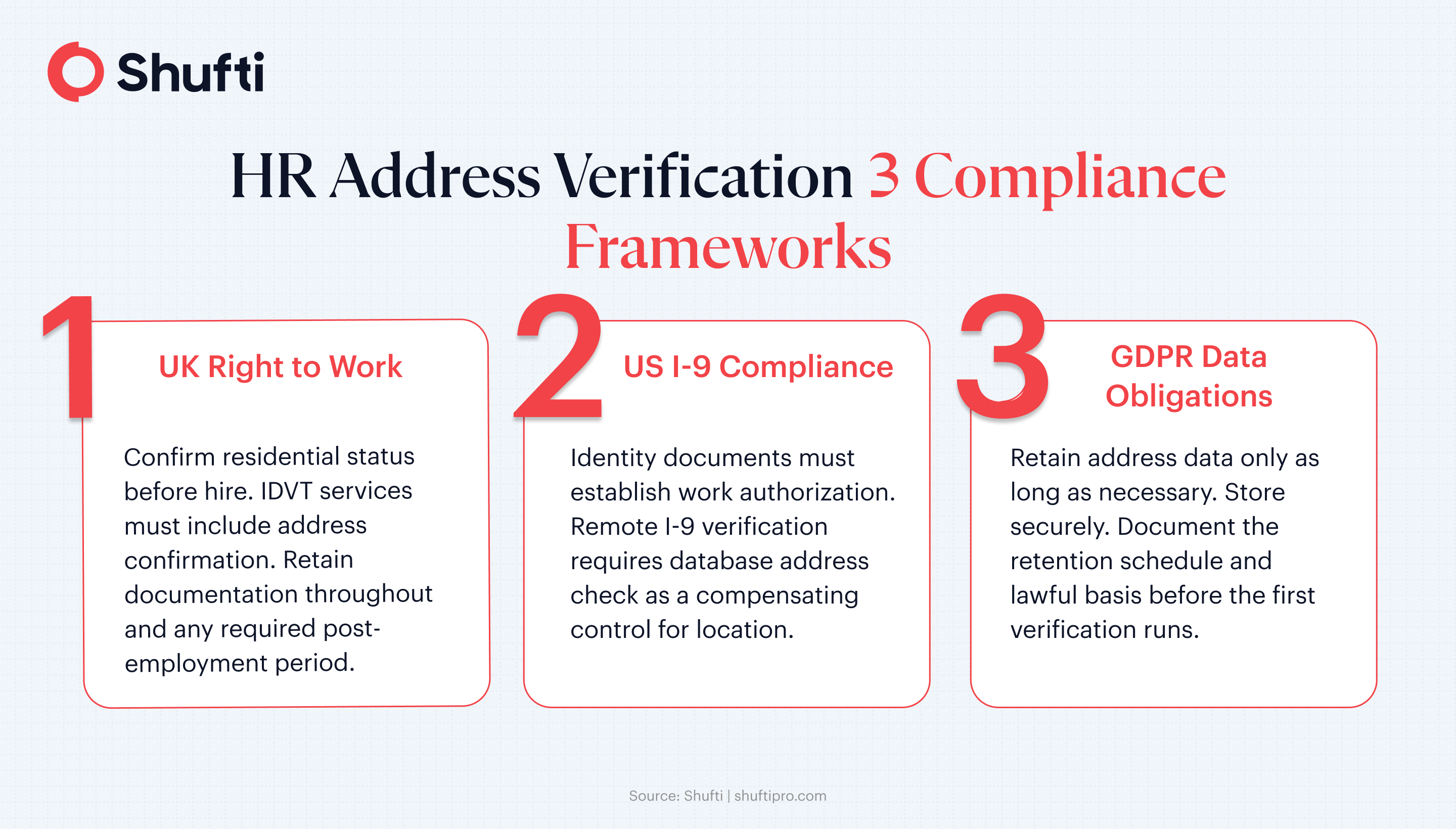
UK Home Office Right to Work guidance requires employers to retain copies of supporting documentation used to establish the right to work, including documentation that establishes a candidate’s residential status where relevant. ICO guidance on employment data handling sets minimum standards for how that address evidence is stored and retained, with proportionality requirements that HR teams must document (ICO, Employment Practices).
In the US, I-9 compliance requires employers to examine documents that establish both identity and employment authorisation. Address evidence supports the identity chain, particularly when remote verification is conducted under DHS-authorized procedures. The combined effect across jurisdictions is that address verification is no longer a background step. It is a documented, auditable process with defined evidence standards.
What does background check address verification actually cover?
The term “background check address verification” describes at least four distinct processes, and HR teams frequently discover mid-audit that the process they had in place was missing a component their regulator expected. Understanding what each layer covers is the first step to designing a workflow that closes the gap.
Document-based proof of address verification confirms that a specific physical document (a utility bill, bank statement, rental agreement, or government correspondence) matches the declared address and has not been tampered with. Document forensics extend this: EXIF and PDF metadata analysis, AI-manipulation detection, layout forgery checks. A utility bill that passes a basic OCR check may still fail document intelligence review if its metadata indicates it was generated by a design tool rather than a utility company’s billing system.
Database-backed verification (sometimes called doc-less or electronic identity verification) cross-references a declared address against authoritative sources: government registries, telecom records, credit bureau data, utility databases. No document upload is required. Results return in under three seconds. Coverage is strong in markets with mature data infrastructure but thinner in MENA, LATAM, and Southeast Asia, where bureau reach is more limited.
Address validation is a third process, often conflated with the above but distinct: it confirms that a given address is real, deliverable, and correctly formatted, without verifying that the specific individual lives there. Useful for logistics and mail confirmation, but not sufficient for compliance-level identity checks.
Documents accepted as proof of address in employment
The most commonly accepted proof of address employment documents are utility bills (electricity, gas, water), bank statements, council tax bills, rental agreements countersigned by a landlord, government-issued correspondence (HMRC, DWP, local authority letters), and tenancy deposit protection certificates. All should be dated within the last three months. Passport and driving licence data can support address verification when the document is current, and the address is independently confirmed against external records, but these are identity documents first and address evidence second.
For HR compliance purposes, the document type must be logged alongside the issue date, provider, and verification method used, to support an auditable record. A verbal confirmation of address (even one recorded in a call log) is not sufficient documentation under current UK and US hiring frameworks.
Where database checks fit alongside document review
Not every hire requires a document upload. In covered markets, database-backed verification handles the majority of address checks quickly, reducing the friction that drives candidate drop-off at the address step. Document-based proof of address steps in where the risk profile, jurisdiction, or regulatory requirement demands documentary evidence: senior hires, positions with financial responsibility, security-cleared roles, or candidates where the database check returns a thin or conflicting result.
A workflow that routes candidates to the appropriate tier based on declared location, risk flags, and role sensitivity produces a more defensible audit record than a uniform document upload requirement. It also reduces friction substantially for standard hires in markets where database coverage is reliable, bringing completion rates up without sacrificing the audit trail.
How does KYC for the hiring process work in practice?
The language of KYC (Know Your Customer) originated in financial services regulation, but the underlying logic maps directly to employment onboarding: confirm that the person you are about to enter a formal relationship with is who they say they are. HR KYC compliance applies the same three-layer approach: identity document check, biometric matching, and address verification.
For most hires, the KYC for hiring process workflow looks like this: the candidate submits identity documents (passport, driving licence, national ID), a liveness check confirms the face on the document matches the person submitting it, and an address check confirms the residential address declared at onboarding. The output is an auditable record (document image, verification result, timestamp, methodology) that the HR team stores alongside the employment file.
Employment checks differ from consumer financial onboarding in a few key ways. GDPR data minimisation rules restrict how long biometric and document data can be retained. The ICO’s employment practices code requires that any data collected during screening is necessary and proportionate to the specific risk being managed. HR teams need to configure their verification workflows to produce the required audit evidence while limiting data retention to the minimum period permitted under the applicable lawful basis.
Mapping the employee screening verification workflow
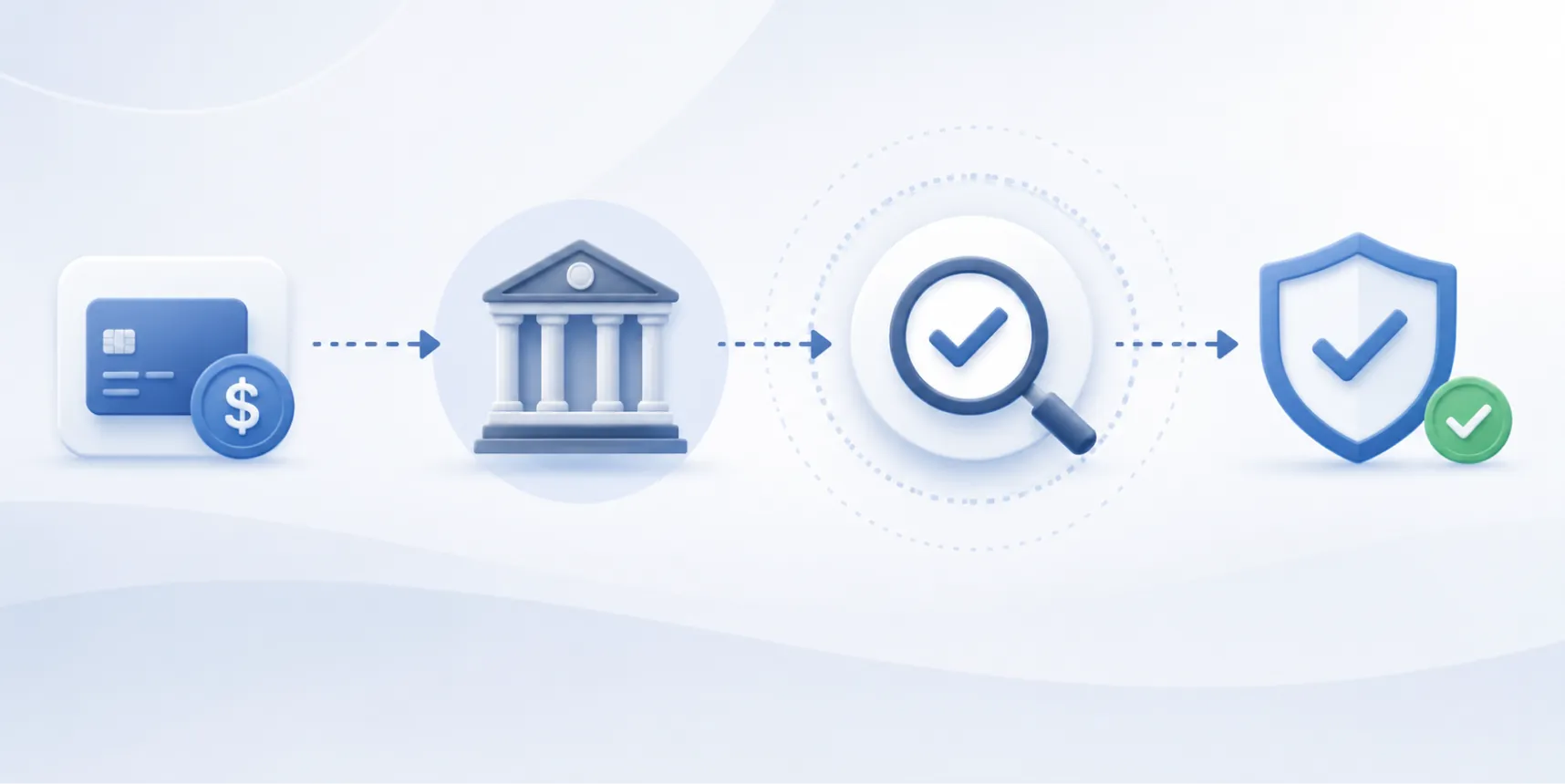
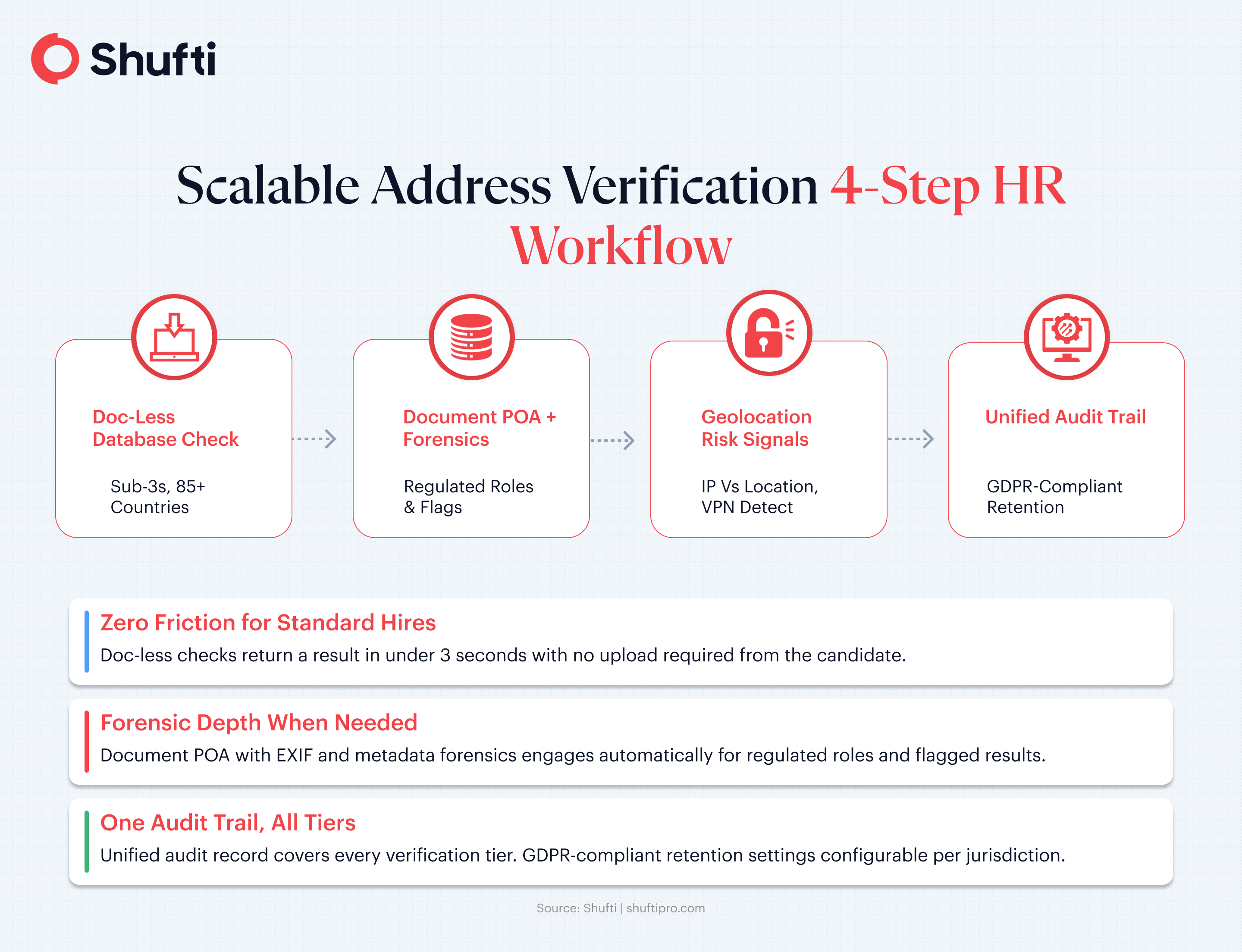
A structured employee screening verification workflow for address checks typically covers five stages: data collection (the candidate declares their residential address and uploads proof if required by the tier), document verification (forensic analysis of any uploaded address evidence), database cross-reference (real-time check against authoritative registries), geolocation risk signals (IP-location comparison, VPN and proxy detection), and audit trail generation (verification outcome, methodology, timestamp, and document hash).
Each stage feeds the next. A database check that returns a mismatch can automatically trigger a document upload request. A document upload that flags in forensic review can route the candidate to a manual review queue. The workflow is configurable, not rigidly linear, and produces a complete audit chain regardless of which path the candidate takes through it.
How identity verification for employees connects to address checks
Identity verification for employees is not a single check. It is a chain of linked processes that is only as strong as its weakest link. A biometric match confirms that the face on the document belongs to the person submitting the selfie. It tells you the identity document is plausibly genuine and being used by its rightful holder. It tells you nothing about whether the residential address associated with that identity is accurate.
Address verification closes that gap. The combination of a confirmed identity and a verified residential address is what the UK Home Office, US DHS, and EU regulators mean when they reference “established identity” in hiring compliance frameworks. Neither check alone provides the complete picture that a regulator reviewing employee files expects to see.
UK Right to Work, US I-9, and GDPR: what HR compliance verification requires
Regulatory expectations for address verification in hiring are jurisdiction-specific. What satisfies a UK audit may not satisfy a US one, and GDPR data-handling requirements apply to most EU-based hires regardless of which employment framework is in force. Multinational HR compliance verification teams most commonly need to align with all three frameworks simultaneously.
Right to work and address evidence in the UK
UK Right to Work legislation requires employers to confirm that a prospective employee has legal authorisation to work before employment begins. The right to work check focuses on immigration status and nationality, but when digital identity verification services approved under the UK IDVT scheme are used, address confirmation is one of the data points the verification service must establish.
The right to work address requirement is most clearly visible in the List B checking procedure for individuals with time-limited permission to remain in the UK. Repeated checks at defined intervals are mandatory. Each check must be logged with documentation, methodology, and outcome. HR teams managing non-UK nationals on work visas need a workflow that triggers re-verification at the correct interval and produces an updated audit record at each check. A missed re-check creates a civil penalty liability that the initial correct check cannot retrospectively resolve.
GDPR’s intersection with Right to Work compliance is specific: the personal data collected to establish the right to work (including address and document evidence) must be retained only as long as the employment relationship continues, plus any additional period required by the Home Office. HR information systems need to enforce this retention period automatically, not through manual case review.
I-9 compliance and address documentation in the US
US I-9 requirements ask employers to examine List A documents (which establish both identity and work authorisation) or a combination of List B (identity) and List C (work authorisation) documents. Address evidence is embedded in the identity documentation chain, particularly for candidates whose documents include residential data (such as REAL ID-compliant state driver’s licenses).
Remote I-9 verification (permitted under DHS alternative procedures for qualified employers) introduces an address verification consideration that in-person I-9 checks do not have: the employer cannot visually confirm the candidate’s location at the time of verification. Database-backed address verification provides a compensating control, confirming that the address declared at onboarding matches authoritative records even when the I-9 documents were reviewed remotely by an authorised representative.
For employees who are also covered by GDPR (staff in US operations of EU-headquartered businesses, or EU residents working remotely for US employers), all address data collected during the I-9 process must be handled in accordance with Article 5 principles: collected for a specific purpose, retained no longer than necessary, and secured against unauthorised access. HR information systems serving both US and EU employees need explicit, jurisdiction-aware data retention configurations rather than a single global default that inadvertently over-retains EU personal data.
Building a scalable address verification workflow for high-volume hiring
HR teams at large organisations run hundreds of concurrent background checks. The operational constraint is not whether to verify addresses. It is how to do so at pace without blocking onboarding timelines, in a way that produces audit-ready records across candidates in different jurisdictions with different document expectations.
For most teams, the answer is an address verification API integration that sits within the broader onboarding platform, triggers automatically at the appropriate workflow stage, and routes each candidate to the correct verification tier without manual case assignment. The integration handles jurisdiction logic and risk routing internally, so the HR team receives the result and the audit record, not the operational mechanics.
Doc-less vs document-based verification: which fits your hiring volume?
Doc-less verification is the right starting point for the majority of hires in markets with mature data infrastructure. It requires no action from the candidate beyond declaring their address at onboarding, returns a result in under three seconds, and produces a clean audit record showing the sources checked and the outcome logged. Candidate drop-off at the address step (a measurable problem in mobile-first onboarding flows where document upload is required) falls sharply when no upload is requested.
Document-based employee address verification is appropriate for a defined subset of cases: regulated roles, positions requiring security clearance, hires where the database check returns a no-match or a conflicting result, or jurisdictions where documentary evidence is a formal legal requirement. The approximately 35-second processing time for document proof of address with forensic analysis is fast enough for these cases without creating a bottleneck in the overall hiring pipeline.
Workforce identity check infrastructure for enterprise teams
An enterprise-scale workforce identity check infrastructure for address verification needs four things: a single API handling both doc-less and document-based tiers without separate integrations, configurable routing logic that assigns the verification method based on declared location and role risk level, a unified audit trail producing consistent records regardless of which tier a candidate went through, and GDPR-compliant data retention that applies the correct retention window per jurisdiction automatically.
Address verification API HR integrations are available as standalone services or as part of broader electronic identity verification platforms. For HR teams already running document checks as part of their background screening process, extending an existing verification integration is typically faster to deploy and easier to audit than standing up a separate address-only service. The audit trail consolidation alone (one evidence format across all check types) reduces the manual effort involved in responding to regulatory information requests.
Practical next steps
Before evaluating any address verification platform or API, HR and compliance teams benefit from a clear picture of their current exposure and their specific regulatory obligations across the jurisdictions they hire in. The following steps reflect what a structured internal assessment typically looks like.
1. Audit the current address step
Start by mapping where the address is collected in your onboarding process and what checks, if any, run against it. For most organisations, this audit reveals that the address step is either absent entirely or relying on a basic format check rather than an independent verification process with a documented outcome. That gap is what auditors and regulators will find first.
2. Map your jurisdiction mix
Different regulatory frameworks impose different address evidence requirements. If your hiring spans UK, US, and EU employees, your workflow needs to produce jurisdiction-appropriate audit records and apply the correct data retention rules to each geography. A single configuration that defaults to the most stringent requirement globally may be simpler to administer than separate jurisdiction-specific setups, but it needs to be a deliberate choice, not an accidental one.
3. Define your role-based risk tiers
Not every hire warrants the same depth of address verification. Financial roles, positions requiring DBS clearance, remote-first hires, and roles involving access to sensitive systems or data all present different risk profiles. Mapping your hiring cohorts to verification tiers before selecting a tool prevents over-engineering for low-risk positions and under-verification for high-risk ones. The tier logic can typically be configured at the API level once the mapping is documented.
4. Resolve your data retention obligations before going live
GDPR and CCPA both impose specific requirements on how long personal data from verification checks (including biometric data and document images) can be retained. This is a compliance decision, not a technical default. The correct retention periods, the lawful basis for each, and the automated deletion schedule need to be documented in your privacy records and configured in the platform before the first live check runs.
5. Pilot before scaling
Before rolling out a new address verification workflow at volume, run it with a defined hiring cohort in one jurisdiction. Track completion rates, time-to-result, escalation rates from doc-less to document-based checks, and any candidate experience feedback. Use the pilot data to tune routing logic and identify edge cases before expanding to other regions or role types. The issues that surface in a 200-candidate pilot are far cheaper to fix than the same issues discovered mid-quarter across a global hiring programme.
How Shufti helps HR and compliance teams verify employee addresses at scale
HR compliance teams running high-volume address checks face two failure modes: friction from document upload requirements that reduce mobile completion rates, and verification gaps from candidates whose AI-generated address evidence passes visual inspection but fails forensic review.
Shufti’s address verification runs doc-less checks against authoritative government, telecom, and credit bureau sources in 85+ countries, returning a result and an audit record in under three seconds with no upload required from the candidate. Where documentary evidence is needed (for regulated roles, thin-data markets, or flagged database results), document proof of address completes in approximately 35 seconds with forensic metadata analysis included. Routing between the two tiers is automatic, based on declared location and role configuration, so the compliance team sets the rules once.
For multinational hiring, the same API produces unified audit trail records regardless of which verification tier each candidate went through, with GDPR-compliant retention settings configurable per jurisdiction.
To explore how Shufti’s address verification handles the compliance depth your HR workflow requires, request a demo.
Frequently Asked Questions
What is address verification in HR, and is it legally required?
Address verification in HR is the process of confirming that a candidate's declared residential address is accurate and supported by evidence. Legal requirements vary by jurisdiction: UK Right to Work checks, US I-9 compliance, and GDPR data-handling standards each establish different obligations, but all require documented address evidence for covered hires.
How can HR teams identify and prevent fake address employment fraud?
Effective fake address fraud prevention requires two layers: database cross-referencing against authoritative records (government registries, telecom, credit bureau data), and document forensic analysis for any uploaded proof of address. A basic OCR check or format validation is not sufficient to catch AI-generated or manipulated address documents.
What does GDPR require HR teams to do with employee address verification data?
GDPR Article 5 requires that address verification records be kept only as long as necessary, stored securely, and not used beyond the original processing purpose. HR teams must maintain explicit retention policies covering these records and communicate the lawful basis to candidates in the hiring privacy notice.
Can address verification work reliably for remote hires across different countries?
Yes. Database-backed address verification covers 240+ countries and returns results without document upload in 85+ countries with authoritative data coverage. For hires in markets with thinner data infrastructure, document-based proof of address with forensic analysis provides a fallback that operates globally with consistent audit output.
What is the difference between address verification and a standard background check?
A standard background check covers criminal records, employment history, and references. Address verification specifically confirms a candidate's declared residential address against authoritative sources or forensically checked documents. Some screening providers include only a basic address format check. Independent database verification with a documented, auditable outcome record is less standard.