AMLR Solutions
 AMLR Consultation
 Onboarding
 Ongoing Monitoring
 FRAML
FRAML KYC
KYC KYB
KYB KYI
KYI Age Assurance
 Workforce IAM
 Candidate Verification
 Account Takeover
 Bonus/ Promotion Abuse
 Chargeback Fraud
 Deepfake
 Document Fraud
 Fraud Networks
 Impersonation Fraud
 Money Mule Activity
 Multi-Accounting
 Party Fraud
 Regulatory & Compliance Risks
 Synthetic Identity Fraud
 Adult Content
 Banking
 Crypto
 Fintech
 Forex
Forex Compliance
 Fraud prevention
 Trust & safety
 Global expansion
 Compliance Officers
 Developers
 Fraud Analysts
 Product Managers
 Advanced Journey Builder (AJB)
 Global Trust Platform
 Customer Profiles
 Vendor Comparison
 IDV Case Management
 AML Case Management
 Regulatory Reporting
 Travel Rule Protocols
 Agentic Rule Builder
 AI Compliance Co-Pilot
 Fraud Analytics
 Fraud Hub
 OCR
OCR Shufti AI
 Bank Account Verification
 Biometric Duplication
 Database Checks
 Document Intelligence
 Government ID
 Mobile Driver's License
 NFC
NFC Selfie Liveness
 Brand Personalisation
 Deployment Options
 Identity Methods
 IDV Modes
 Multi-tenancy
 On-Premise IDV
 Secure Capture









As of 2025, the Nigerian Communications Commission (NCC) requires every mobile SIM card in Nigeria to be linked to a National Identification Number (NIN), and lines that remain unlinked face deactivation. That single policy has turned NIN retrieval into one of the most searched identity topics in the country. Whether you need your NIN to re-link a SIM, open a bank account, or apply for a passport, this guide covers every confirmed method that works and explains what NIN verification means for businesses that onboard Nigerian customers.
A National Identification Number (NIN) is an 11-digit unique identifier issued by the National Identity Management Commission (NIMC) to every registered Nigerian citizen and legal resident. The NIN links biometric data, including fingerprints and a facial image, to a centrally maintained government database and is the country’s primary civilian identity record.
Why does Nigeria require NIN for SIM registration and banking?
Nigeria made NIN a prerequisite for SIM registration and bank account opening to eliminate anonymous mobile identities that had been exploited for fraud and crime, and to anchor financial inclusion to a verified national identity record. The NCC introduced the NIN-SIM linkage policy in December 2020 following a government directive to address kidnapping coordination, SIM-swap fraud, and illicit money transfers conducted through unregistered lines. The requirement applies to all mobile network subscribers in Nigeria, including foreign nationals who have resided in the country for two or more years.
On the financial services side, the Central Bank of Nigeria (CBN) has incorporated NIN verification into its tiered Know Your Customer framework for banks and fintechs. Tier 2 and Tier 3 account holders are required to provide a NIN at onboarding, and institutions are expected to cross-reference that NIN against the NIMC database before account activation. This is designed to reduce synthetic account fraud and impersonation at the point of onboarding rather than after losses occur.
NIN also sits at the centre of an expanding set of public services. As of 2025, NIMC has made NIN verification mandatory for passport applications, driving licence renewals, voter registration, and tax identification. Nigeria is building toward a model where the NIN functions as the single identity anchor for all civic and financial activity, and both public agencies and private institutions are expected to verify it, not simply collect it.
Each NIN can be linked to a maximum of three SIM cards across any Nigerian mobile network. Lines beyond three must be deactivated. If a SIM remains unlinked, the network operator is required to restrict it from calls, messages, and data access under current NCC subscriber rules.
How to check your NIN number on MTN, Airtel, Glo, and online
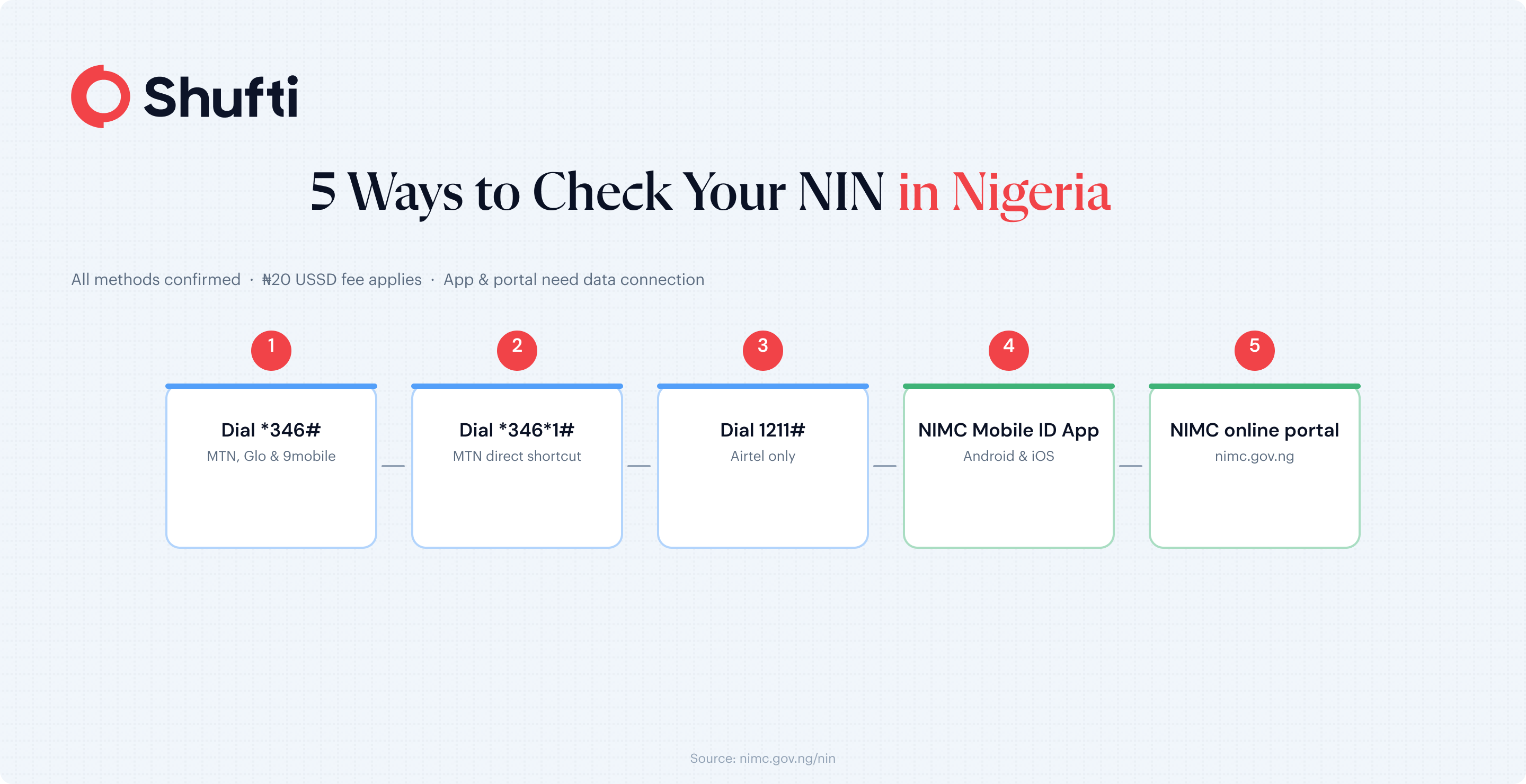
Checking your NIN does not require a visit to an NIMC enrolment centre. Three USSD-based methods and two data-based methods each work in under two minutes. The USSD codes differ slightly by network, so the subsections below cover the major carriers separately, followed by the app and online options for when you do not have airtime.
How to check your NIN on MTN and Glo
Dial *346# from the phone number linked to your NIN and select the NIN retrieval option from the menu. Your 11-digit NIN displays on screen if the SIM was registered with NIMC at enrolment. This USSD code works on MTN, Glo, and 9mobile. A service charge of ₦20 applies per retrieval.
On MTN specifically, dialling *346*1# takes you directly to the retrieval screen without navigating the full USSD menu. To link an MTN SIM to your NIN for the first time, dial *785*[your 11-digit NIN]# from the number you want to register and follow the confirmation prompts.
How to check your NIN on Airtel
Airtel uses a separate code from the other major networks. Dial 1211# from your Airtel line and select the NIN retrieval option from the resulting menu. If the SIM was linked to your NIN at registration, the 11-digit number will appear on screen. A ₦20 retrieval charge applies.
If your Airtel SIM is not yet linked to your NIN, visit your nearest Airtel customer service centre or an NIMC enrolment point with your NIN and a valid government-issued ID to complete the linkage.
How to check your NIN without airtime, using the NIMC app or online portal
Two data-based options are available if you prefer to avoid the USSD airtime charge. First, download the NIMC Mobile ID app from Google Play or the Apple App Store. Log in with your 11-digit NIN and the phone number you used at enrolment. The app displays your full NIN details and generates a virtual NIN (vNIN), which you can share with institutions instead of your real NIN for an added layer of security.
Second, visit the NIMC online verification portal at nimc.gov.ng. Provide your NIN and complete a CAPTCHA to confirm basic identity details. No airtime or USSD access is needed. Both options require an active data connection.
Why is NIN fraud a growing compliance risk?
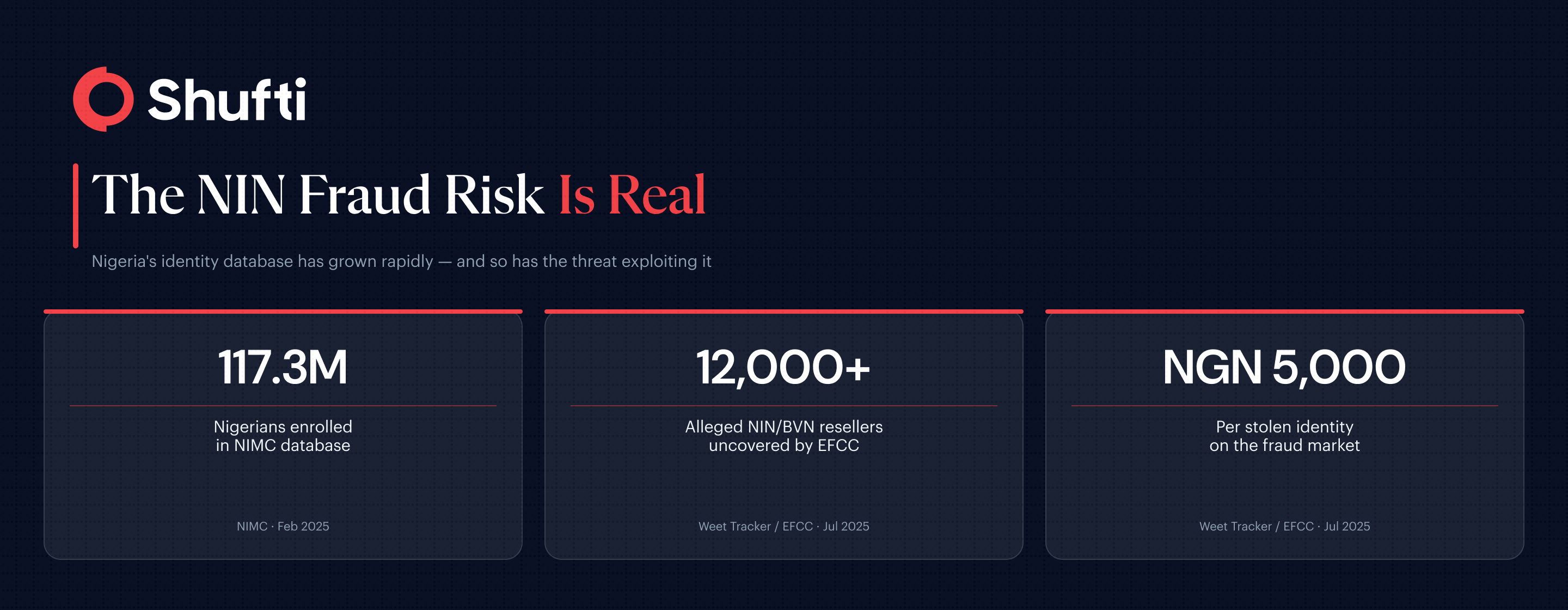
Nigeria’s national identity database has grown rapidly. As of February 2025, over 117.3 million Nigerians had enrolled in the NIMC database, according to the NIMC enrolment dashboard. That scale makes the NIN both a national asset and a prime target for exploitation, and a July 2025 investigation put the scope of the threat into sharp focus.
The Economic and Financial Crimes Commission (EFCC) uncovered a scheme in which over 12,000 individuals were allegedly harvesting and reselling NINs and Bank Verification Numbers (BVNs) to fintech companies for as little as NGN 5,000 per identity, according to Weet Tracker’s report citing the EFCC. Those stolen identities were then used to open accounts linked to investment fraud and cryptocurrency money laundering. The EFCC noted the activity amounted to “a threat to national security.”
The fraud persists because manual NIN collection creates a gap. Gathering a NIN without verifying it against the NIMC database in real time does not confirm identity. It confirms that a customer knows a NIN, which is not the same thing. A valid but stolen NIN passes a document-only review. The mismatch only surfaces when the check includes a live database query paired with real-time identity database verification.
NIMC responded in May 2025 by launching NINAuth, a platform providing government agencies and private companies with a web interface, mobile app, and open API for real-time NIN authentication. The launch marks a clear shift in regulatory expectations. NIN verification is now expected to draw on a live government database query, moving beyond document collection alone.
How Shufti helps Nigerian businesses verify NIN automatically
Nigeria’s NIN-based identity infrastructure is maturing fast, and the expectations placed on businesses are moving with it. The NIMC NINAuth launch means regulators and enterprise clients now expect NIN checks to run against the government database in real time, not via offline document review or unverified data submission. For businesses that still rely on manual NIN collection, the gap between what regulators expect and what the current process delivers is widening.
Shufti’s eIDV solution connects directly to government identity databases, validates a customer’s NIN against the NIMC record, and cross-references the result with the personal details they provide at onboarding. When the record matches, the identity is confirmed. When a discrepancy appears, the flag surfaces before the account opens. The full check completes in seconds, removing the manual review step that currently creates the opening for stolen identities to slip through undetected.
Shufti supports identity verification across 240+ countries and territories from a single API, which means Nigerian businesses serving diaspora customers or cross-border users can handle international onboarding without building a separate stack for non-Nigerian documents.
Manual NIN checks leave a gap that Nigeria’s identity fraud market is actively exploiting, and businesses running document collection without real-time database cross-referencing are carrying identity risk they may not have priced in. Shufti’s electronic identity verification runs NIN lookups against the NIMC database automatically, so matches and mismatches surface at the point of onboarding rather than in a fraud review weeks later. Request a demo to see how the NIN verification flow works across your existing onboarding steps.
Frequently Asked Questions
How do I find my NIN number?
Dial *346# from the phone number linked to your NIN and select the NIN retrieval option from the menu. Alternatively, log into the NIMC Mobile ID app using your registered phone number. A ₦20 service charge applies to the USSD method.
How do I check my NIN on MTN?
On MTN, dial *346# and follow the prompts to retrieve your NIN. You can also dial *346*1# to go directly to the retrieval screen. The code works on any MTN SIM that has been registered and linked to your NIN at enrolment.
How do I check my NIN number on Airtel?
Airtel users dial 1211# and select the NIN retrieval option from the menu. This code is specific to Airtel lines. A ₦20 retrieval fee applies.
How many SIMs can I link to my NIN?
A maximum of three SIM cards can be linked to one NIN, regardless of which network they are on. Any additional lines beyond three must be deactivated under NCC subscriber registration requirements.
What if my SIM is not linked to my NIN?
An unlinked SIM can be restricted or deactivated by your network operator. To link it, dial *785*[your NIN]# on MTN, or visit your nearest network service centre or NIMC enrolment point with your NIN and a valid government-issued ID.
Can I check my NIN online without a phone?
Yes. Visit the NIMC online verification portal at nimc.gov.ng and provide your NIN alongside a CAPTCHA to confirm basic identity details. A data connection is required, but no SIM card or airtime is needed.
How do I check my NIN if I don't have airtime?
Download the NIMC Mobile ID app from Google Play or the Apple App Store. The app requires a data connection rather than airtime. Log in with your NIN and registered phone number to view your details and generate a virtual NIN for sharing with institutions.