AMLR Solutions
  AMLR Consultation
 EUDI Wallet
 Onboarding
 Ongoing Monitoring
 FRAML
FRAML KYC
KYC KYB
KYB KYI
KYI Age Assurance
 Workforce IAM
 Candidate Verification
 Account Takeover
 Bonus/ Promotion Abuse
 Chargeback Fraud
 Deepfake
 Document Fraud
 Fraud Networks
 Impersonation Fraud
 Money Mule Activity
 Multi-Accounting
 Party Fraud
 Regulatory & Compliance Risks
 Synthetic Identity Fraud
 Adult Content
 Banking
 Crypto
 Fintech
 Forex
Forex Compliance
 Fraud prevention
 Trust & safety
 Global expansion
 Compliance Officers
 Developers
 Fraud Analysts
 Product Managers
 Journey Builder
  Global Trust Platform
 Customer Profiles
 Vendor Comparison
 IDV Case Management
 AML Case Management
 Regulatory Reporting
 Agentic Rule Builder
  AI Compliance Co-Pilot
  Fraud Analytics
 Fraud Hub
  OCR
OCR Shufti AI
 Bank Account Verification
  Biometric Duplication
 Database Checks
 Document Intelligence
 Government ID
 Mobile Driver's License
 NFC
NFC Selfie Liveness
 Brand Personalisation
 Deployment Options
 Identity Methods
 IDV Modes
 Multi-tenancy
 On-Premise IDV
 Secure Capture
 Shufti MCP
















TL;DR
- Shufti’s AppExchange app runs KYC, document, and AML checks inside Salesforce.
- Results are written back to the record automatically in under 15 seconds.
- Automated verification can cut KYC review times by up to 60%.
- Salesforce provides a KYC data model but no built-in verification engine.
Flows and validation rules can act on the verification status field. Your compliance team lives in Salesforce. Your identity verification process probably does not. Someone is toggling between the CRM and a separate IDV portal, copying verification outcomes into Contact fields by hand, and triggering follow-up steps manually. That workflow slows onboarding, creates audit inconsistencies, and gives prospects enough time to drop off before a check even completes.
Financial institutions that have moved to automated identity verification report potential reductions of up to 60% in KYC review times and a 50% reduction in manual errors. Those gains are difficult to reach when verification runs in a separate tool from the team’s primary system of record. The practical fix is to run those checks inside the CRM itself.
This post explains what Shufti’s Salesforce AppExchange app does, how the verification flow works, and which compliance requirements it covers.
Why compliance teams need KYC inside their CRM
Salesforce is the world’s leading CRM. It holds roughly 20.7% of the global CRM market and is used by more than 150,000 companies, including over 90% of the Fortune 500. For financial services firms and fintechs, it is the system of record for customer data. Relationship managers, compliance officers, and onboarding teams run most of their daily work from inside it.
When identity verification runs outside that system, results have to be captured manually. An agent reads a result email from the verification provider, updates a Contact field, and attaches a PDF. At low volumes, that is manageable. At scale, it becomes a bottleneck, and the audit trail it produces is inconsistent.
The cost of a fragmented verification workflow
The problem is not only time. Inconsistency creates downstream compliance risk. Fields get updated at different intervals, verification status goes stale, and Salesforce automations that should fire on a confirmed identity never trigger because the field was not updated in the expected format. Regulated firms need a clear record showing exactly when a check ran, what it returned, and who acted on it.
What FATF Recommendation 10 requires
FATF Recommendation 10 sets the global floor for customer due diligence. Firms must identify and verify the customer, identify the beneficial owner, understand the purpose of the business relationship, and conduct ongoing due diligence. These obligations do not specify where verification happens, but they do require firms to produce records on demand. Running checks inside Salesforce and writing outcomes to the native record creates that trail without additional data-migration steps.
How Salesforce handles KYC natively, and where the gaps appear
Salesforce Financial Services Cloud includes a built-in KYC data model and a Discovery Framework for structuring client onboarding journeys. It gives compliance teams a schema for storing verification information. What it does not include out of the box is a verification engine. That means no document forensics, no biometric AI, and no sanctions screening capability built in.
That verification layer requires a third-party provider. The practical question for any Salesforce admin is whether that provider means a custom development project or an AppExchange install.
How Shufti’s AppExchange app works
Shufti is listed on Salesforce AppExchange as a packaged KYC and AML compliance application. It installs through the standard AppExchange process. No custom API build, no middleware, and no developer sprint are required.
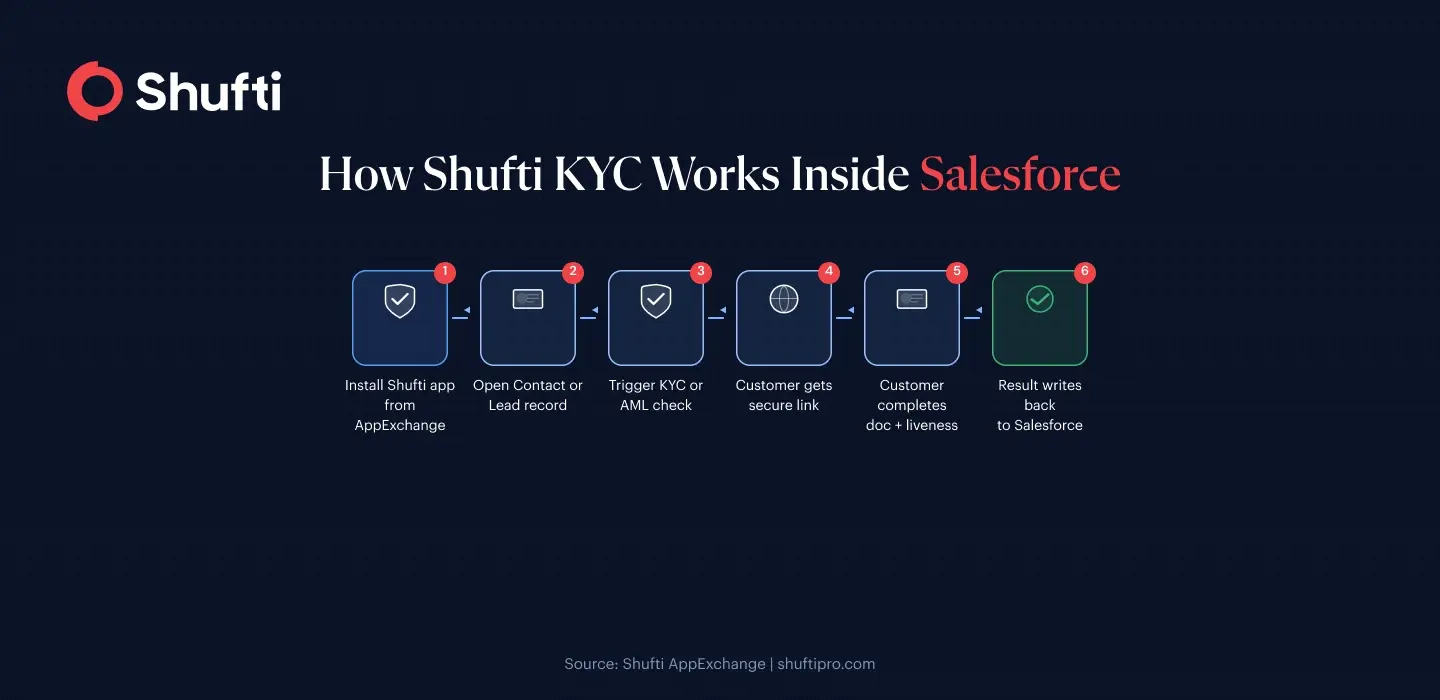
Once installed, Shufti adds a verification widget and a set of standard fields to Contact, Lead, and Account records. A compliance officer or relationship manager triggers a check directly from the record view. The customer receives a link, completes verification on their device, and the outcome writes back to the Salesforce record automatically.
What gets installed
The package adds verification-trigger buttons to the page layouts you choose, a Lightning component showing the current verification status, and custom fields that store the verification reference ID, outcome, timestamp, and document type. Your Salesforce admin maps these to your existing compliance fields and controls which profiles can trigger a check.
What the verification flow looks like
The agent opens a Contact or Lead record and clicks the verification button. Shufti generates a secure link and sends it to the customer by email or SMS. The customer photographs their ID document and completes a short liveness check on their phone. Shufti’s AI then runs document verification, face verification, and, where configured, AML screening against 3,500+ global watchlists, 2.6 million PEP profiles, and 215 sanction regimes. Results are written to the Salesforce record in seconds.
The entire process stays inside Salesforce from the agent’s perspective. The customer completes verification on their own device.
What Shufti covers from inside Salesforce
The AppExchange integration gives Salesforce orgs access to Shufti’s full verification stack. Document checks run against 10,000+ document types from 240+ countries. Facial biometrics include iBeta Level 1 and Level 2 certified liveness detection. AML screening covers 100,000+ data sources updated every 15 minutes. Where address verification is required, it can run in the same session.
For firms on Salesforce Financial Services Cloud, verification outcomes populate the platform’s native KYC data model objects, so compliance reports referencing standard FSC objects pull the correct data. For firms on Sales Cloud or Service Cloud, the custom fields work the same way.
Salesforce Flows, validation rules, and Process Builder can reference the verification status field to automate downstream steps. Practical examples include routing a verified lead to a relationship manager, placing an account in a review queue, or blocking a record update until a check passes. For teams building more involved onboarding journeys, Shufti’s KYC API supports deeper configurations when the AppExchange package defaults need extending.
The integration supports GDPR-compliant data handling under Shufti’s SOC 2 Type II, ISO 27001:2013, and PCI DSS-certified infrastructure. Data residency options are available for European deployments. Teams looking for a broader grounding in KYC and AML compliance obligations will find context there on which verification modules to configure for specific markets.
Frequently Asked Questions
Does Shufti work with Salesforce Financial Services Cloud?
Yes. The AppExchange package maps to Salesforce Financial Services Cloud’s native KYC data model. Verification outcomes populate the standard FSC objects used in compliance reporting, so no custom field mapping is required.
What Salesforce objects does the Shufti app work with?
The package supports Contact, Lead, and Account records. Your Salesforce admin decides which page layouts include the verification widget and which user profiles can trigger a check.
Do my customers need to leave Salesforce to complete verification?
No. From your team’s perspective, the process stays inside Salesforce. Your customer receives a secure link by email or SMS and completes verification on their own device. The outcome writes back to the record automatically.
How long does setup take?
Installation follows the standard AppExchange process. Most teams complete the basic setup, covering package installation, field mapping, and widget placement on page layouts, within a single working day. More complex Salesforce Flow automations depend on your org’s existing configuration.
Is the Shufti Salesforce integration GDPR-compliant?
Yes. Shufti operates under SOC 2 Type II, ISO 27001:2013, and PCI DSS certified infrastructure. Data residency options are available for European deployments, and the platform supports GDPR obligations for firms processing EU personal data.
Can verification results trigger Salesforce workflow automations?
Yes. The verification status field is a standard Salesforce field once the package is installed. Salesforce Flows, validation rules, and Process Builder can reference it to route verified leads, flag accounts for review, or block record updates until a check passes.